Posting on Social Media: A Practical 2026 Workflow Guide
·16 min read
You've got five platform tabs open, one campaign brief, and a caption that already has several slightly different versions. The image looks right on Instagram, the link preview is missing on Facebook, and LinkedIn has truncated the sentence that carried the main point. The scheduler says everything published successfully, but one account is still empty.
That's the part of posting on social media most advice skips. Publishing isn't just a creative task or a hunt for the perfect time slot. It's a distribution operation involving account permissions, platform-specific formatting, media handling, scheduling logic, retries, and live verification. A strong idea can still underperform when the wrong crop, caption structure, or publishing path reaches the feed.
Why Posting on Social Media Feels Harder Than It Should
The work usually starts with a good post. A marketer writes the core message, adds a graphic, selects a link, and opens a platform composer. Then the adaptations begin. Instagram needs a different visual treatment, LinkedIn needs a more conversational opening, X needs a tighter structure, and TikTok may need an entirely different video edit.
After that, production friction takes over. Someone copies the caption into the wrong account, someone forgets to replace a platform-specific call to action, and someone schedules the post in the team's local timezone instead of the audience's timezone. None of these errors necessarily produces an obvious warning.
Practical rule: Treat every scheduled post as a small release, not as a saved draft.
A post can technically publish and still fail operationally. The link may not generate a preview. The video may display with awkward cropping. The first line may be buried below the fold. A carousel can lose its intended sequence when the upload order changes. These are silent failures, because the platform confirms delivery while the audience receives a weakened version.
The hidden distribution problem
Diagnosing weak reach as a content problem is common. Sometimes the creative is weak, but the more common issue is a mismatch between one message and several feed environments. Platform ranking systems increasingly use engagement signals, relevance, and user behavior, including watch time and engagement rate, to decide what users see. Hootsuite's overview of social media algorithms describes these signals as important priorities across major networks.
That changes the production brief. You aren't publishing the same asset several times. You're translating a message into formats that give each platform the information and behavior it can evaluate properly.
Why consistency alone doesn't solve it
Consistent posting helps only when the workflow protects quality at the point of distribution. A team can maintain a reliable calendar and still lose performance through stale captions, broken previews, unsuitable aspect ratios, or missing retries.
The fix isn't endless experimentation with generic timing advice. Build a repeatable system that separates the source idea from its platform versions, checks each render before release, and confirms the live result afterward. Once those controls exist, creative decisions become easier because fewer operational mistakes obscure what works.
The Fragmented Audience Reality
A post can be approved, scheduled, and delivered while reaching only part of its intended audience. Social media is now a mass publishing environment, with around two in three people worldwide using social media, according to DataReportal's 2026 social media users coverage. That scale creates opportunity, but audiences remain divided across networks with different habits, formats, and expectations.
We Are Social's mid-year 2026 update reports that 56.3% of internet users aged 16 and older said they used Facebook in the past month, while Instagram reached 71.4%, YouTube 70.6%, WhatsApp 69.8%, and TikTok 47.5%. The report also identifies Facebook as the most popular platform by self-declared use, with Instagram, YouTube, WhatsApp, Messenger, and TikTok reaching substantial audiences. A single publishing queue therefore cannot assume that one caption, crop, or link treatment will work everywhere.
Map attention before assigning effort
Choose networks according to the job each post needs to do:
- Discovery: Short video and visually immediate posts can support awareness in recommendation feeds.
- Conversation: Text-led networks suit opinions, questions, and timely responses.
- Education: Longer explanations, carousels, and video lessons need enough space for the audience to follow the argument.
- Conversion: Link-focused posts need a clear route from feed interaction to the landing page.
SocialBee's 2026 analysis reviewed 9,332,840 posts across 10 networks. Facebook represented 44.5% of posts, X 14.8%, Instagram 12.8%, and LinkedIn 11.6%. The analysis published by SocialBee found that these four networks accounted for more than 80% of the posts analyzed, showing how publishing effort is concentrated across a small group of platforms.
Those proportions are not a scheduling template. Use them to question default distribution, then select primary platforms based on audience fit. For secondary networks, decide whether the content needs a native adaptation, a lighter version, or no post.
Before committing more resources to a platform, it helps to look at the audience signals around the accounts, creators, and topics relevant to your market. SoLeads, a social media data exporter can organize publicly available profile, follower, comment, and engagement data from multiple social networks into structured files, giving teams another way to compare audiences and inform platform priorities.
Cross-posting needs an adaptation layer
Identical publishing saves production time but often creates weaker audience experiences. A LinkedIn caption may feel over-explained on X. A vertical TikTok video may lose its focal point in a square feed. A call to action can also become awkward when each platform handles links differently.
Create a platform map for each recurring content type. Record the preferred media shape, opening style, link treatment, caption length, and need for native editing. Add the platform's retry and preview behavior to the map, so a failed upload or malformed card does not pass through the queue unnoticed. This turns fragmented attention into a production system the team can check and maintain.
The Prepare-Adapt-Preview-Schedule-Verify Workflow
Reliable publishing follows a sequence. Skipping a step saves a few minutes at the beginning and can cost an entire campaign at the end.
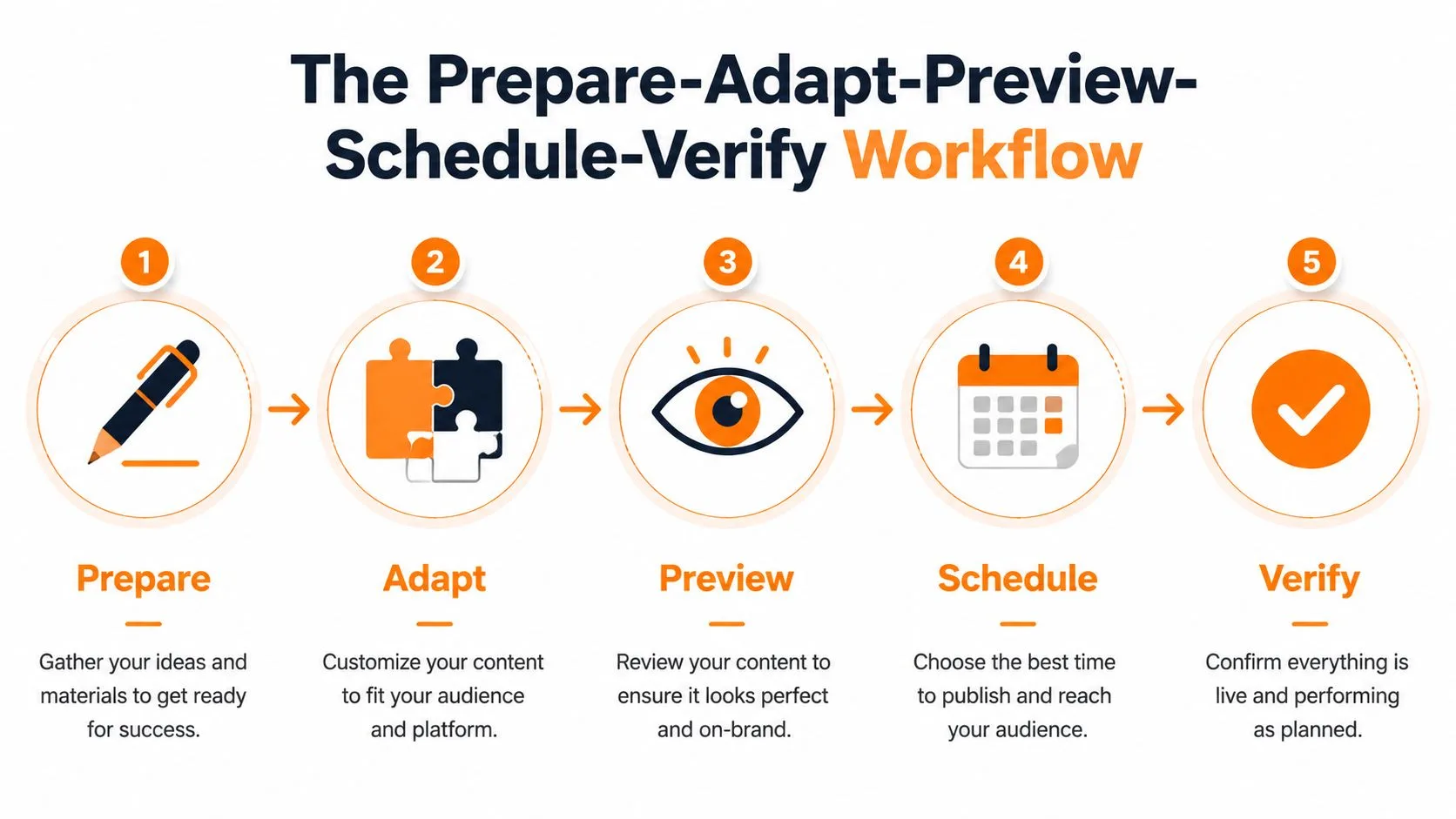
Prepare one complete source post
Keep the original idea outside the platform composer. The source document should contain:
- Core claim: The single point the audience should remember.
- Evidence or context: The detail that makes the claim credible.
- Media direction: The image, video, carousel, or graphic required.
- Destination: The landing page or next action, if one exists.
- Call to action: The behavior you want from the reader.
This prevents the common situation where the caption exists in one document, the approved link sits in a chat thread, and the final asset lives in an unlabelled folder. Use a campaign name and version label so the team can identify the approved material without opening every file.
Adapt for the destination
Adaptation is more than shortening. Change the opening, pacing, media treatment, and action based on the platform. A product announcement might become a concise statement on X, a practical explanation on LinkedIn, a graphic-led carousel on Instagram, and a short demonstration on TikTok.
Don't force every message onto every network. A destination earns a post when the audience and format justify the work.
Preview the actual render
Open the preview for every account before scheduling. Check the mobile line breaks, caption truncation, link preview, image crop, subtitles, thumbnail, and upload order. If the post includes text inside an image, inspect it at the size users will see in the feed rather than relying on the original design file.
A preview also catches accidental leftovers, such as a LinkedIn phrase in an Instagram caption or a tracking parameter copied from the wrong campaign. These errors are easy to miss when the team reviews only the source version.
Schedule with queue logic
Use a calendar that shows account, format, campaign, timezone, and status together. Separate recurring evergreen slots from time-sensitive posts. If a post depends on an event, product release, or news moment, assign a person to confirm that the content is still valid before it goes live.
Avoid building a queue that publishes several versions of the same idea too close together. Repetition can make a healthy content plan feel automated, especially when the same followers see multiple channels.
Verify after publication
A scheduled confirmation isn't proof that the audience received the intended post. Check the live URL or feed entry after publishing. Confirm the correct account, media rendering, caption, link, tags, and visibility settings.
For team workflows, record verification in the content calendar. A simple status such as Scheduled, Published, Checked, or Needs repair gives everyone a clear handoff and prevents a missing post from remaining invisible for hours.
Native Tools Versus Centralized Schedulers
Native publishing tools give you the closest connection to each platform's own composer. They're useful when one network drives the strategy, when the post depends on a platform-specific editor, or when the team wants to inspect every native option manually. Meta Business Suite, LinkedIn's composer, and X's native scheduling tools can each handle focused workflows without introducing another publishing layer.
The trade-off is context switching. Moving among accounts makes it easier to paste the wrong caption, miss an approval, overlook a timezone setting, or forget to check a post after publication. Native tools also make cross-platform reporting and queue management more fragmented.
Centralized schedulers solve the coordination problem. A single calendar can show campaigns across Facebook, Instagram, X, YouTube, TikTok, LinkedIn, Threads, and Bluesky, while a shared composer can keep the source message and its adaptations together. The cost is that centralized tools may not expose every platform-specific editing feature, so some content still belongs in the native app.
| Scenario | Native Tools | Centralized Scheduler |
|---|---|---|
| One primary network | Simple and direct | May add unnecessary workflow |
| Several active networks | Creates account switching | Consolidates calendar and queues |
| Platform-native video editing | Usually the stronger choice | Often requires a prepared asset |
| Recurring evergreen posts | Manual repetition can become tedious | Queue rules reduce repetitive work |
| Detailed cross-account approvals | Scattered across platforms | Easier to manage in one workflow |
| Last-minute platform feature | Immediate access | Feature availability may vary |
| Post-publication verification | Direct feed access | Requires a deliberate verification step |
Choose based on the actual bottleneck
If content creation is slow, a scheduler won't solve the main problem. If adaptation is the bottleneck, a centralized composer helps only when it lets you edit each destination separately. If distribution logistics consume the team's time, consolidation becomes more valuable.
A hybrid approach often works best. Create and polish a native Instagram Reel in the platform environment, then use a centralized scheduler for approved text updates, adapted images, and recurring campaign posts. The comparison of native scheduling and social media platform workflows can help teams assess that boundary before changing tools.
Donivo is one centralized option that supports planning and publishing across multiple networks, with queue-based scheduling, platform-aware media handling, automatic retries, and email notifications for failed publishes. It should be evaluated against the team's account permissions, approval needs, native feature requirements, and publishing volume.
Minimum Viable Cadence and the No-Post Penalty
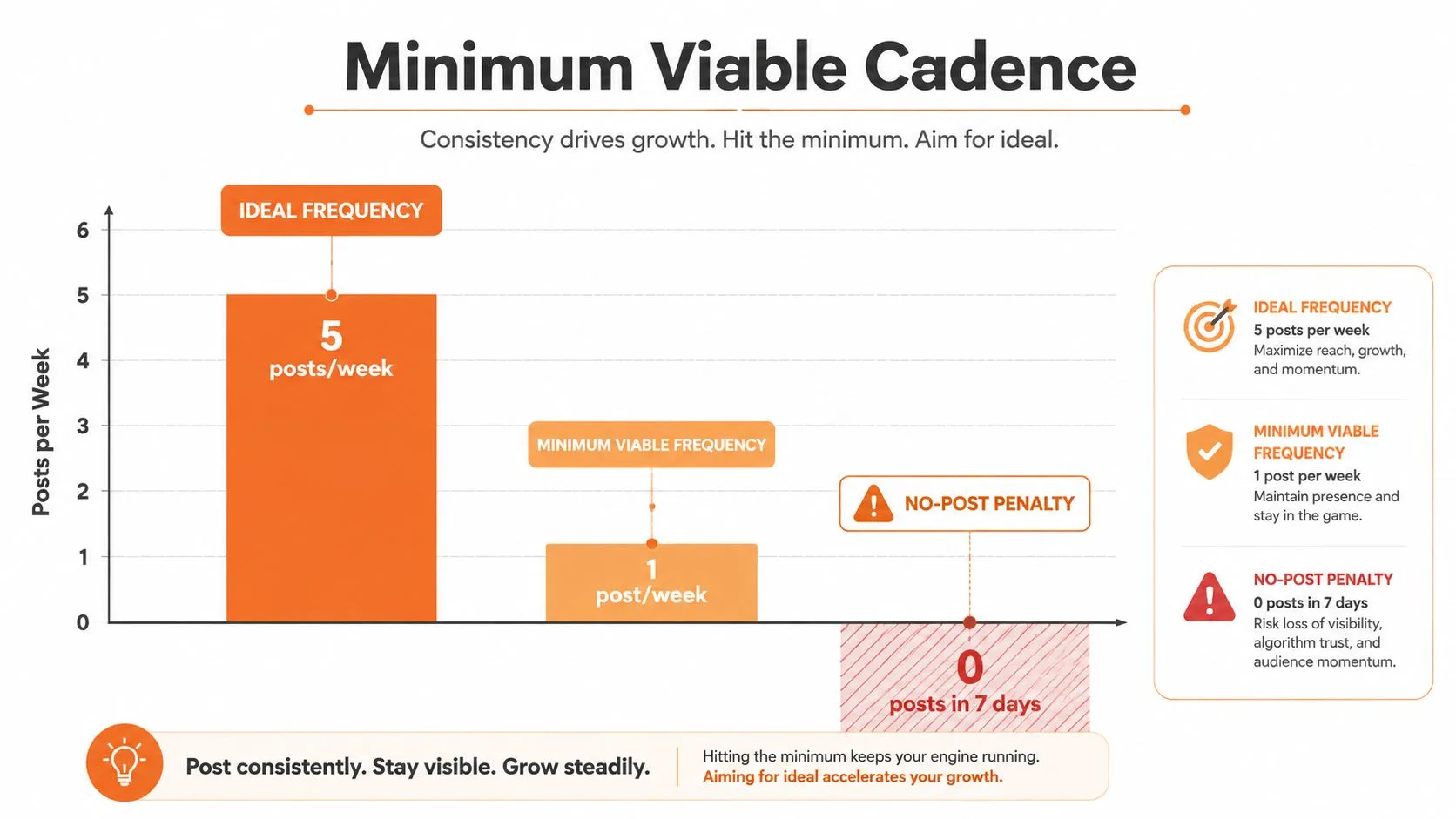
The useful frequency question isn't “How do I post constantly?” It's “What is the smallest sustainable cadence that keeps the account active?” That framing matters for small teams, founders, and creators who can produce thoughtful work but can't maintain a high-volume content machine.
A 2026 engagement study found that weeks with no posts consistently underperformed baseline growth, while one to two posts per week improved outcomes. Accounts publishing 10 or more times per week averaged 32 additional followers per week compared with silent weeks, according to Buffer's 2026 State of Social Media Engagement.
Build a floor, not a fantasy schedule
The data supports a practical distinction between a minimum viable cadence and an aggressive growth cadence. A minimum cadence protects continuity. A higher cadence creates more opportunities to learn, distribute, and appear in feeds, but it also increases production pressure and the chance of repetitive or rushed content.
Text-heavy networks can require more frequent participation because posts have a shorter lifespan and conversation is part of the value. Visual platforms may support a slower rhythm when each asset carries more production effort. These are operating assumptions, not universal rules. Use your own saves, replies, profile visits, and qualified actions to adjust the schedule.
Silence isn't the only risk
Posting less publicly has become more common and more selective. A 2026 survey summary reported that more than half of Americans post less than they did five years ago and have become more selective about who can see their posts. The same summary cites benchmark posting frequencies of 3.7 posts per week on Instagram and 3.0 on Facebook, both described as six-year lows. The survey summary from Augment Code places the shift in the context of privacy and selectivity.
That doesn't mean every account needs to publish more. It means the schedule should reflect the account's purpose and capacity. Choose a floor you can maintain during a busy month, then add posts only when they serve a clear content or business goal.
Sustainable cadence: A smaller queue of useful, adapted posts is stronger than a large queue the team can't review or verify.
Optimizing for Platform-Specific Algorithm Signals
A post can be accurate, polished, and still lose distribution after a weak opening, incorrect format, or failed upload retry. Ranking systems commonly assess engagement signals, relevance, and user behavior. Watch time, engagement rate, and content relevance affect whether a platform continues showing the post to more people, as described in Hootsuite's algorithm guide.
Build the first frame or line for the behavior you need. A video should identify its subject quickly and give viewers a reason to continue. Text should make the value clear in its opening line. A carousel needs a first card that sets up a specific reason to swipe. Final polish cannot repair an opening that fails to earn attention.
Edit for retention rather than runtime
Video length has no universal winning formula. One study found an engagement optimum at 34.69 seconds, with performance declining for both shorter and longer clips. The study published through the Marketing Trends Congress archive supports editing for retention instead of extending a clip to increase runtime.
Treat that finding as a creative prompt, not a fixed rule. A short awareness clip may need one hook, one proof point, and one action. An educational video can run longer when each section earns continued attention. Review where viewers leave, then remove pauses, repeated context, or a delayed payoff.
Match the platform's native behavior
A 60-second tutorial may need a shorter, hook-led TikTok cut, a caption-supported Instagram version, and a more explanatory LinkedIn edit. A LinkedIn carousel can become an Instagram Stories sequence, but its copy must be rebuilt for tap-through behavior rather than swipe-based reading.
Check the operational details before publishing. Watermarks from another platform, subtitles outside safe areas, and horizontal edits in vertical-first placements can make content feel imported or render poorly. Keep separate exports, captions, thumbnails, and retry rules for each destination so one failed adaptation does not block the entire queue.
Timing helps establish a test schedule, not a permanent answer. Use a best-time-to-post planning tool, then compare results by format, opening, audience, and platform. Record failed publishes separately from weak-performing posts, because a reach problem and a delivery problem require different fixes.
Pre-Publish Checklist and Failure Recovery
A final check should be short enough to use every time and specific enough to catch real errors. Before scheduling, confirm:
- Account: The selected profile, page, workspace, and permissions are correct.
- Media: The file, crop, aspect ratio, thumbnail, subtitles, and upload order match the destination.
- Copy: The opening, mentions, hashtags, punctuation, and call to action belong to that platform.
- Link: The URL works, tracking is correct, and the preview displays as intended.
- Timing: The timezone, date, queue position, and campaign dependency are correct.
- Status: An owner knows who will inspect the live post.
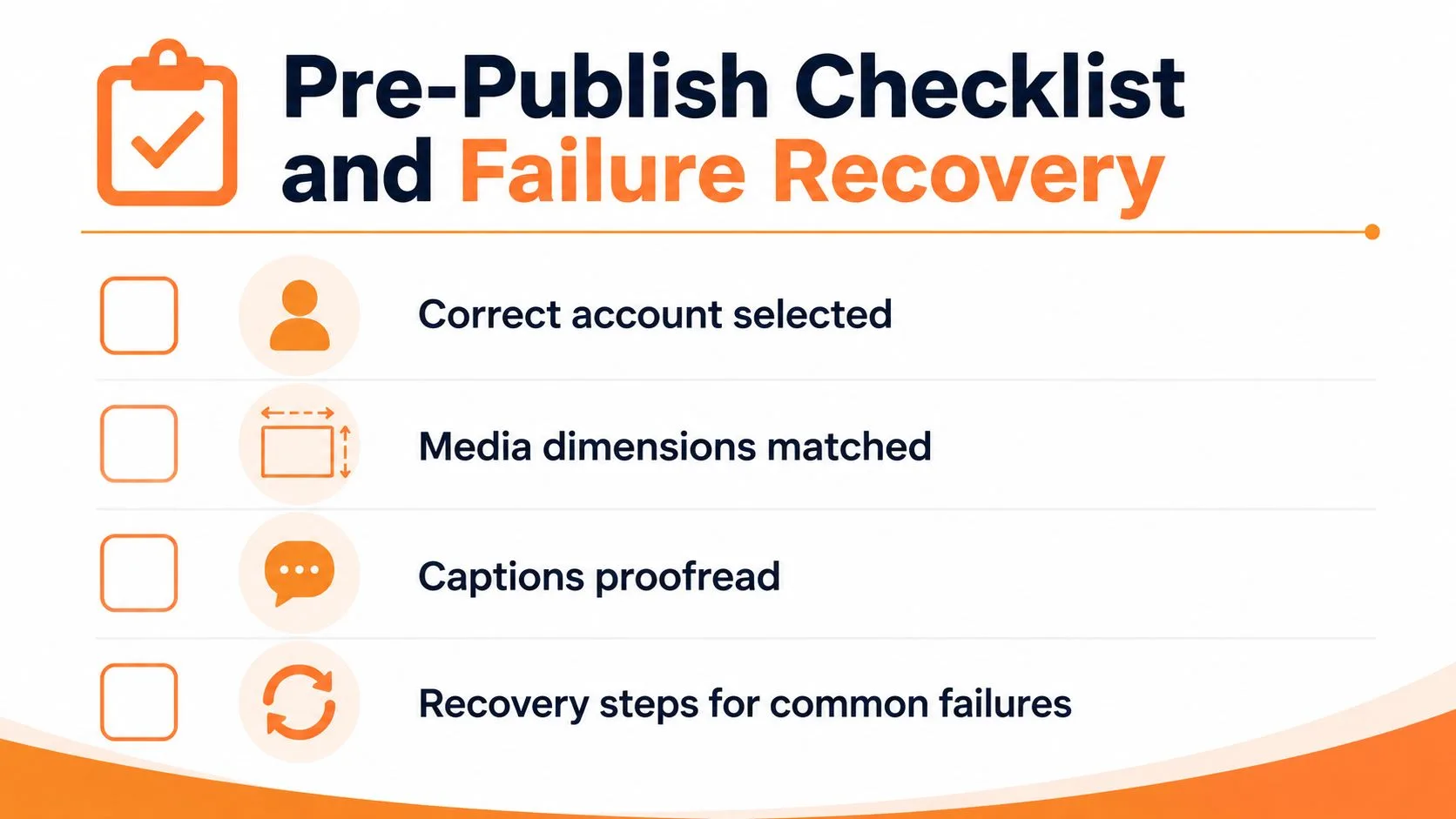
If a post doesn't appear, first check the scheduler log and the platform account connection. An expired OAuth token usually requires reconnecting the account, while a platform-side publishing issue may require waiting, checking the error detail, and retrying. Don't immediately create a duplicate post until you confirm whether the first attempt reached the feed.
If the post published but looks wrong, capture the live version, identify whether the problem is copy, media, preview, or rendering, then edit or remove it according to the platform and campaign risk. If it went to the wrong account, stop further automation, document the incident, remove the post where appropriate, and reconnect the correct account before rescheduling.
Recovery sequence: Confirm the result, diagnose the failure class, repair the account or asset, then republish once.
A scheduler with automatic retry logic and email alerts can reduce the chance that a failed publish disappears unnoticed, but verification still belongs in the operating procedure. Use this social media publishing checklist as a shared reference for owners and approvers.