Social Media Checklist: 8 Steps for Better Posts
·Updated ·16 min read

Clicking Schedule doesn't mean a post is finished. It means one step in the publishing process is finished.
A dependable social media checklist also confirms the right accounts, adapts the source post for each platform, checks media dimensions and links, reviews the queue, allows time for recovery, verifies the live result, and records what the audience did afterward. The practical loop is simple: prepare, choose, adapt, preview, schedule, verify, measure.
That loop works at different scales. A solo creator can use it to publish one video across Instagram, TikTok, and YouTube without losing track of edits. A small team can assign approval and reporting. An agency can separate client workspaces and permissions. A nonprofit can protect campaign links, coordinate volunteers, and confirm that fundraising posts went live.
The checklist below treats scheduling as an end-to-end operating routine, not a button.
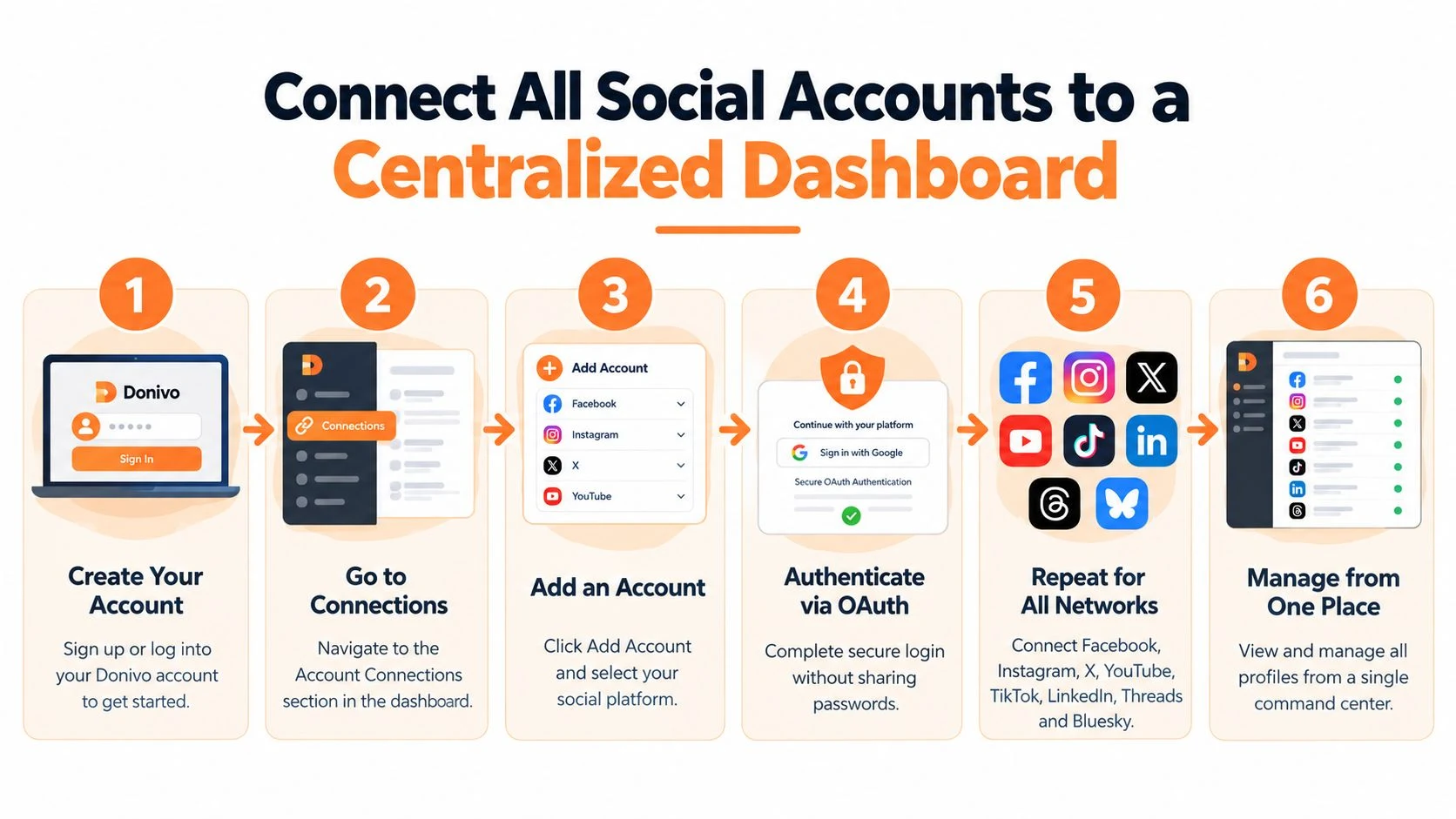
1. Connect All Social Accounts to a Centralized Dashboard
Disconnected accounts create avoidable mistakes. Someone posts to the wrong profile, forgets a secondary network, or spends time switching between apps instead of reviewing the content itself. A centralized dashboard gives the team one place to connect accounts, select destinations, schedule posts, and inspect the publishing queue.
Use secure account authorization rather than sharing passwords. Donivo connects profiles through OAuth, and its platform states that passwords aren't stored. Start with your primary accounts, test the workflow with a low-risk post, and only then add secondary or test profiles. A solo creator might begin with Instagram, TikTok, and YouTube. An agency can keep each client's profiles in the appropriate workspace, while a nonprofit can manage Facebook, LinkedIn, and Instagram for a fundraising campaign.
The account list should be documented, not left to memory. Record the profile owner, purpose, connected team members, and the person responsible for reauthorization if access expires.
Make access part of the checklist
Account consolidation improves visibility only when permissions remain clear. Assign workspace members the access they need instead of passing around login credentials. Remove inactive or duplicate profiles during regular audits, and verify that ownership remains with the brand rather than a former contractor or agency.
The security side deserves its own review. Independent audit guidance highlights access permissions, connected apps, recovery details, two-factor authentication, devices, and former collaborators as important governance checks. Account governance guidance also reinforces the need to verify who can post, who can approve, and who can recover an account.
Practical rule: Connect one primary account, publish a low-stakes test, confirm the result, and document the connection before expanding the workspace.
For a more detailed operating model, use this guide to manage multiple social media accounts. The right setup should reduce context switching without turning one dashboard into an unexamined collection of old permissions.
2. Plan Your Content Calendar With Queue and Schedule Features
A queue is useful for repeatable publishing. A calendar is useful for judgment.
The queue handles posts that are ready to move through defined time slots. The calendar shows whether the overall mix makes sense, whether several promotional posts are clustered together, and whether a campaign has enough supporting content around its main announcement. Donivo supports queue-based scheduling, specific publishing times, recurring slots, and a calendar view, so a team can combine evergreen content with one-off campaign work.
Begin with a source post and a clear destination list. Then decide which content belongs in a recurring slot and which content needs a manual approval step. Weekly tips, community reminders, and company culture posts often fit a repeatable queue. Product launches, public statements, and event changes deserve a fresh review before they publish.
Use timing as a testable decision
Scheduling time shouldn't rely on a generic “business hours” rule. Buffer's analysis of 9.6 million Instagram posts identified Thursday at 9 a.m., Wednesday at 12 p.m., and Wednesday at 6 p.m. as strong performance windows in that dataset, but the useful operational lesson is to localize timing by network and audience rather than copy one universal slot. The 2026 social posting-time analysis recommends validating candidate windows against at least 90 days of native analytics and normalizing results by reach instead of relying only on raw engagement.
Build a simple day-hour grid for each important network. Alternate candidate windows while keeping the content format consistent, then review the result. Schedule evergreen posts 24 to 48 hours ahead when possible, leaving room for edits, approvals, or a sudden change in the news cycle.
The calendar should also show campaign sequence, not just isolated posts. Place teasers, the main announcement, and follow-ups on staggered dates so the audience receives context instead of repeated reminders.
For a practical planning workflow, compare queue design with these content calendar tools. The best calendar is the one your team can review quickly and keep current.
3. Leverage Platform-Specific Image and Video Optimization
One source asset rarely belongs on every network unchanged. A portrait image may suit an Instagram feed, while a wider format works better for another destination. A caption that makes sense on LinkedIn may need a shorter opening and different call to action on TikTok or Threads.
Start with a high-quality master asset, then create destination versions. For Instagram, commonly recommended feed dimensions include 1080×1080 pixels for square posts, 1080×1350 pixels for portrait posts, and 1080×566 pixels for horizontal posts. Stories and Reels typically use 1080×1920 pixels in a 9:16 ratio. Hootsuite's image-size guide provides the platform reference, while Donivo's image sizes and resizer utility helps turn the source asset into usable variants.
Instagram's 1080×1350 pixel, 4:5 portrait format is widely treated as a safe feed default because it occupies more vertical space on mobile. That doesn't mean every creative should be forced into portrait. The right format depends on the asset, the destination, and whether cropping damages the message.
Protect the important part of the creative
Stories and Reels need a center-safe composition because interface controls can cover the edges. One guide recommends keeping text and logos inside a central 1080×1420 pixel area. The center-safe composition reference is especially useful for campaign graphics, subtitles, faces, and logos.
Keep the same discipline with profile assets. Instagram profile photos are commonly displayed at 320×320 pixels and rendered as a circle crop, so a centered subject and generous margin help preserve the mark. Buffer's Instagram sizing reference explains why an edge-to-edge logo can lose important detail.
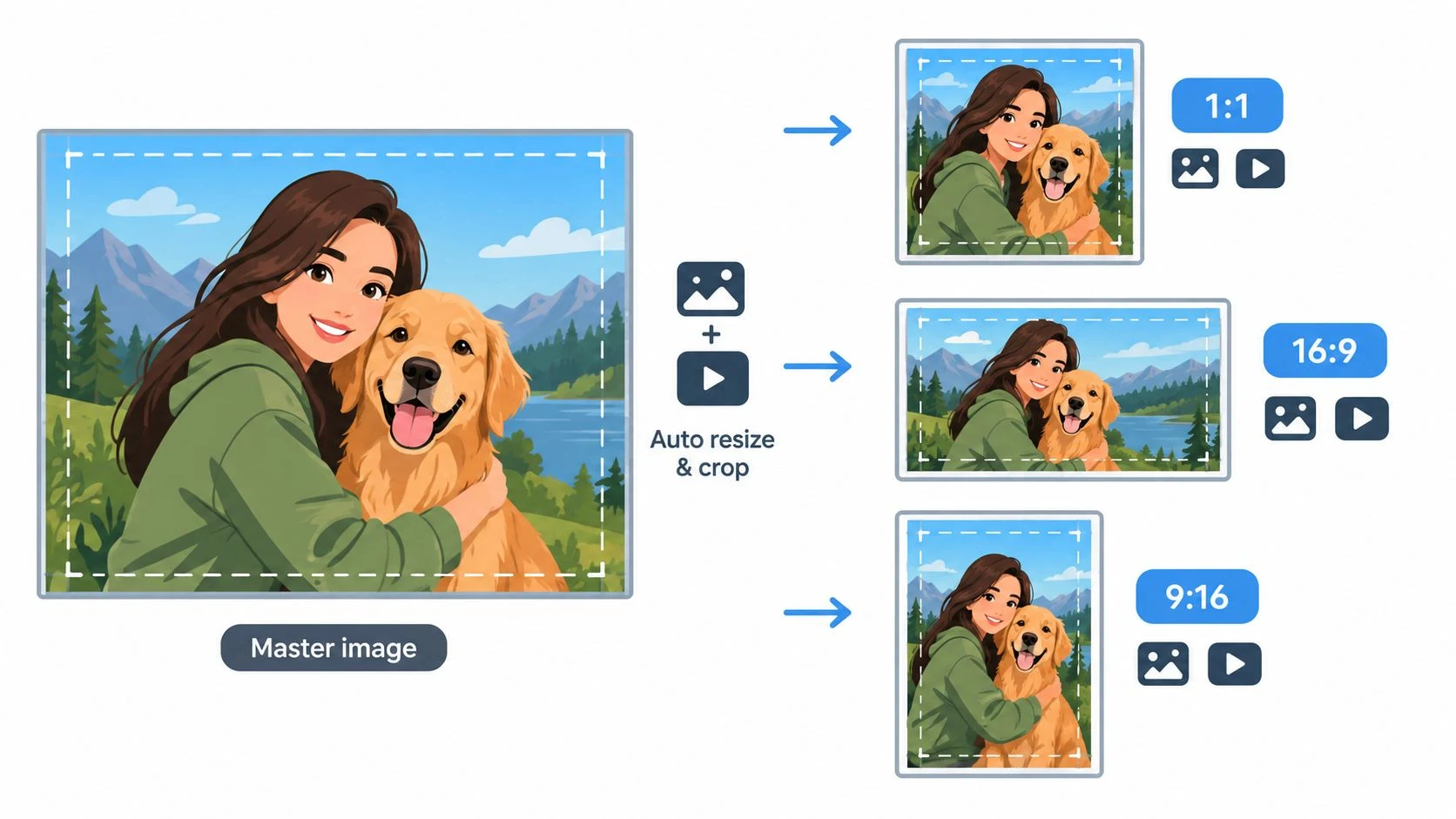
Preview every destination before adding it to the queue. Check cropping, text placement, thumbnail quality, video playback, captions, and link behavior. Automation saves time, but a preview remains the final creative judgment.
4. Set Up Automatic Retry and Email Notifications for Failed Posts
A scheduled post can fail after the team has stopped watching the screen. Network interruptions, platform API changes, expired authorization, account restrictions, or a link review can interrupt delivery. The dangerous failure is the silent one, when nobody knows that an important post never appeared.
Treat delivery as an operational process with an alert path. Donivo provides automatic retry for failed publishes and email notifications, giving the system a chance to reattempt a temporary failure while informing a person when intervention is needed. That matters for a product launch, an event reminder, a fundraising appeal, or any post tied to a narrow campaign window.
Separate temporary failures from content problems
A retry can help with a transient platform or network issue. It won't fix a restricted account, an expired authorization, a rejected link, or media that violates a destination's requirements. The alert should lead to a short response procedure:
- Review the error: Identify whether the problem involves authorization, media, account restrictions, or the platform itself.
- Confirm the account: Check that the profile is still connected and that the responsible team member has access.
- Inspect the post: Review the URL, caption, image, video, and destination-specific version.
- Choose the recovery action: Retry, edit, reschedule, or publish manually through the native platform.
- Record the pattern: Note the platform, time zone, asset type, and error so repeated failures become visible.
Don't schedule a time-sensitive announcement at the exact moment you expect the audience to see it if there's no recovery margin. Build enough lead time for an alert, a correction, and a second attempt. Keep notification recipients current, especially after a team change or client handoff.
The social media automation workflow is most useful when it includes this exception handling. A scheduler should reduce routine effort, but it shouldn't hide delivery status.
5. Use Free Planning Utilities to Optimize Posting Strategy
Good planning tools don't replace judgment. They make the judgment easier to apply consistently.
Before scheduling, use a timing utility to compare audience activity with the campaign objective. Reach, engagement, clicks, and conversions may call for different decisions, so don't treat one recommended time as a permanent rule. Donivo's free planning collection includes Best Time to Post, an Engagement Rate Calculator, Social Media Holidays, a Thread Splitter, Social Post Preview, and a UTM Link Builder.
Each tool solves a different checkpoint:
- Best Time to Post: Use audience activity to generate candidate windows, then validate them against native analytics.
- Engagement Rate Calculator: Turn likes, comments, and other available inputs into a consistent measure for monthly comparison.
- Social Media Holidays: Review cultural and seasonal moments before building a calendar, especially for nonprofits and community organizations.
- Thread Splitter: Break a long source idea into readable segments for a thread without manually counting every line.
- Social Post Preview: Inspect the destination version for cropping, broken links, and awkward formatting.
- UTM Link Builder: Add campaign parameters so social referrals can be connected to the correct initiative in analytics.
Keep the tools inside the publishing loop
A tool becomes useful when it changes a decision. If the timing output suggests a different window, test that window. If the calculator reveals that comments are rising while clicks remain flat, adjust the call to action. If a holiday calendar identifies a sensitive date, reconsider the tone or delay an evergreen promotion.
Use Donivo's free social media management tools as a planning layer, not as a substitute for platform data. A separate resource can also help teams find the best free management software, but compare tools by workflow fit, account permissions, previews, alerts, and export needs rather than by feature count alone.
Run the same checks every month. Consistency makes changes easier to interpret and prevents the calendar from becoming a collection of guesses.
6. Implement a Multi-Workspace Structure for Team Collaboration and Client Separation
A shared dashboard needs boundaries. Without them, personal content can sit beside client campaigns, a nonprofit appeal can be sent from the wrong brand, or a contractor can retain access after the project ends.
Use workspaces to separate accounts, scheduled posts, team members, and approval paths. A freelancer might keep personal publishing separate from client work. An agency can create one workspace per client. A growing brand can separate regional teams or distinct business lines. The structure should match how responsibility is assigned, not merely how the accounts happen to be grouped.
Donivo's plan structure provides a personal workspace only on the Free plan, 2 workspaces including the personal workspace on Starter, 5 workspaces including the personal workspace on Pro, and unlimited workspaces on Agency. Account and post limits vary by plan. Review those limits against the way your team operates before migrating a large client portfolio.
Give people the narrowest useful access
Permissions are part of quality control. The person who drafts captions doesn't necessarily need permission to connect accounts. The person who approves a nonprofit campaign may not need access to a client's unrelated workspace. Assign roles around drafting, editing, approval, publishing, and reporting.
Use consistent names such as Client-Name or Brand-Name. Add an owner and an offboarding contact to the workspace record. During a quarterly access review, remove former collaborators, check connected accounts, and confirm that the client or brand owns the recovery details.
A clean workspace also improves handoffs. When a new team member sees the calendar, queue, account list, and approval rules in one place, they're less likely to rely on private messages or undocumented habits.
7. Optimize Multi-Platform Posting With Simultaneous Cross-Network Publishing
Writing a core message once can save time. Copying it unchanged everywhere can reduce relevance.
Use simultaneous publishing for coordinated announcements, recurring updates, and campaigns that need to appear across several networks together. Donivo's centralized composer supports publishing to Facebook, Instagram, X, YouTube, TikTok, LinkedIn, Threads, and Bluesky from one interface, with platform-aware publishing for supported media and content fields.
The source post should carry the central idea, not every final detail. Build the destination versions before scheduling:
- Instagram: Lead with the visual and use a caption that works with the feed format.
- LinkedIn: Add professional context, evidence, or a clear organizational implication.
- TikTok and Reels: Use a vertical video version with an opening that works immediately.
- YouTube: Give the longer version a title and description suited to video discovery.
- Threads and Bluesky: Make the post conversational and easy to continue.
- Facebook: Include the context and link details the community needs.
Decide when not to cross-post
Cross-network publishing is efficient when the audience, timing, and purpose overlap. It's a poor choice when a platform has a different relationship with the audience. A customer service account shouldn't automatically receive every sales announcement. A nonprofit may need a donor-focused Facebook version and a volunteer-focused LinkedIn version even when both refer to the same report.
Use coordinated timing without demanding identical copy. WaveGen.ai's cross-platform strategy guide can provide additional planning context, but the final decision should come from your audience, account role, and campaign objective.
Preview each destination. Verify that links, hashtags, mentions, thumbnails, and calls to action survived adaptation. One source post is efficient. One unchanged post everywhere is usually lazy.
8. Monitor Performance Metrics and Adjust Strategy Based on Engagement Data
Publishing ends the preparation cycle, not the management cycle. After a post goes live, verify the result and record enough information to make the next decision.
Start with the metrics that match the objective. Engagement rate, reach, click-through rate, conversions, response time, follower growth, impressions, and referral traffic are all useful, but they answer different questions. A nonprofit measuring a donation appeal needs a different first view than a creator assessing community discussion. An agency should report both the client's requested outcome and the operational signals that explain it.
Build a review rhythm
A lightweight monthly review can compare top posts, content types, publishing windows, audience growth, and link activity. Use a spreadsheet or dashboard with consistent fields. Record the network, date, time, format, topic, caption style, call to action, reach, engagement, clicks, and meaningful replies.
Don't change five variables at once. If you're testing timing, hold the format and message style steady. If you're testing a video hook, keep the publishing window comparable. This makes the result easier to interpret, even when the audience response is noisy.
Native analytics should remain the source of truth for platform performance. Donivo supports publishing efficiency, while the team still needs to inspect each network's reporting area and connect campaign links to broader analytics.

A useful review ends with a calendar change. Keep the format that supports the objective, revise the weak opening, shift the candidate time, improve the link destination, or stop repeating a post type that no longer earns attention. This audience connection guide offers broader engagement context, but your own audience data should decide the next experiment.
8-Point Social Media Checklist Comparison
| Item | Implementation Complexity | Resource Requirements | Expected Outcomes | Ideal Use Cases | Key Advantages |
|---|---|---|---|---|---|
| Connect All Social Accounts to a Centralized Dashboard | Medium, OAuth setup per account; one-time configuration | Low–Medium, time to connect; plan upgrade for large accounts | High, Unified visibility and faster publishing across networks | Teams, agencies, creators needing centralized control | Centralized management; no password storage; multi-platform support |
| Plan Your Content Calendar with Queue and Schedule Features | Medium, calendar learning curve and recurring rules | Medium, upfront content creation; post limits on lower tiers | High, Consistent posting and better campaign timing | Batch creators, seasonal campaigns, content teams | Batch scheduling; visual calendar; recurring slots |
| Leverage Platform-Specific Image and Video Optimization | Low, automated resizer; occasional manual edits for complex assets | Low, upload master files (recommended large originals) | High, Improved visual quality and engagement per platform | Design studios, video creators, marketing teams | Automatic format adaptation; saves editing time; reduces crop issues |
| Set Up Automatic Retry and Email Notifications for Failed Posts | Low, enabled by default; monitoring workflow needed | Low, email handling and team response process | High, Increased publish reliability and faster incident detection | Time-sensitive campaigns, launches, high-volume publishers | Auto-retry logic; failure alerts with diagnostics; logs for troubleshooting |
| Use Free Planning Utilities to Optimize Posting Strategy | Low, immediate access, simple tools | Very Low, free utilities; needs historical data for accuracy | Medium, Better timing and basic performance insights without cost | Small teams, creators, budget-conscious users | Free Best Time to Post, Engagement Calculator, previews, holiday calendar |
| Implement Multi-Workspace Structure for Team Collaboration and Client Separation | Medium, workspace creation and permission setup; admin overhead | Medium, may require higher plan for many workspaces | High, Clear separation, improved security and auditability | Agencies, multi-brand organizations, freelancers with clients | Isolated workspaces; role-based access; prevents accidental cross-posting |
| Optimize Multi-Platform Posting with Simultaneous Cross-Network Publishing | Low, compose once, review platform previews | Very Low, saves significant posting time | High, Wider reach and consistent messaging with reduced effort | Brands and solopreneurs aiming for broad distribution | Single-compose publishing; platform-aware adaptation; major time savings |
| Monitor Performance Metrics and Adjust Strategy Based on Engagement Data | Medium-High, manual data pulls from native analytics | Medium, time for analysis, spreadsheets, reviews | High, Data-driven improvements and optimized content ROI | Growth teams, agencies, performance-focused brands | Identifies top content, informs strategy, validates decisions with metrics |
Turn the Checklist Into a Publishing Habit
A social media checklist works when it becomes a repeatable publishing habit rather than a document someone opens only after a mistake. Before scheduling, confirm the workspace, connected accounts, permissions, destination versions, media dimensions, caption edits, links, tags, and approval status. Preview each post, place it in the right queue, and leave enough recovery time for an alert or failed delivery.
After scheduling, monitor notifications and inspect the live result. Confirm that the correct account published the correct version, that the media displays properly, and that the link opens as intended. Record the result in the same place where the team plans the next calendar. That closes the loop between execution and learning.
The right cadence depends on the audience and operating model:
- Solo creators: Review the queue weekly, batch evergreen content, and check live posts after important launches or collaborations.
- Small teams: Assign one person to creative approval, one person to publishing QA, and one owner for monthly reporting. Avoid shared responsibility with no named final reviewer.
- Agencies: Standardize workspace naming, client permissions, approval rules, and failure-response procedures. Include access audits in onboarding and offboarding.
- Nonprofits: Pair campaign checkpoints with link testing, recovery contacts, volunteer access reviews, and monthly measurement. Sensitive appeals deserve more review than routine community updates.
A platform such as Donivo can support the routine by combining account connections, queue and calendar scheduling, platform-aware media handling, automatic retries, email notifications, multi-workspace organization, and planning utilities. The tool matters less than the operating discipline around it. Prepare the source, adapt the destinations, schedule responsibly, verify delivery, and let the results shape the next calendar.