Social Media Management Workflow That Actually Ships
·17 min read

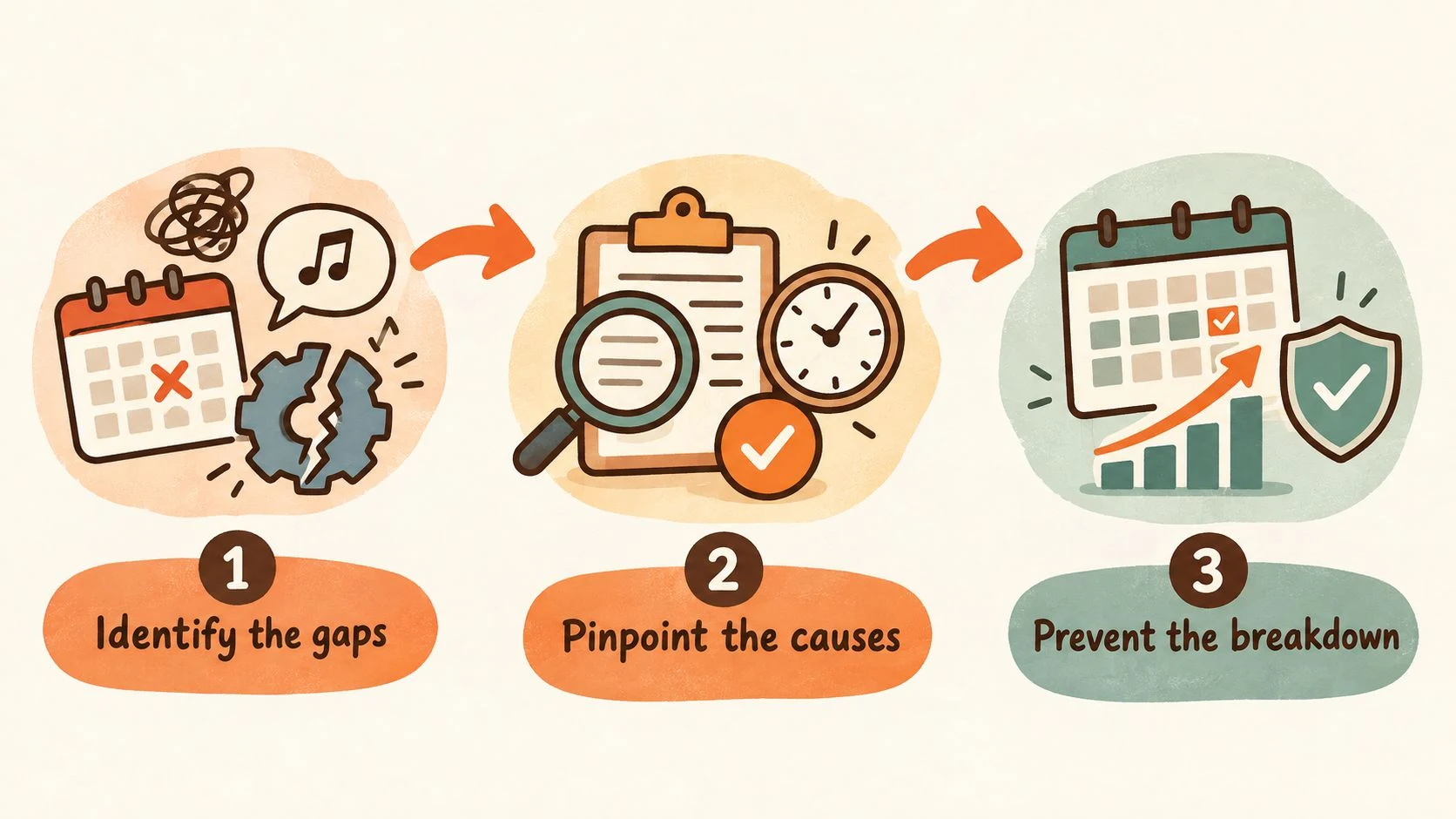
Monday starts with three drafts due, two approvers on vacation, and a trending sound that will not wait for your content calendar. Then someone notices that a scheduled post failed overnight without an alert. The team spends the morning searching through chat threads, old folders, and platform dashboards instead of publishing.
That is not only a tool problem. It is a social media management workflow problem. A scheduler answers when a post should go live, but a workflow defines who plans it, creates it, reviews it, publishes it, monitors the response, reports the result, and decides what happens next.
The Week That Breaks Without a Real Workflow
A reliable social media operation runs as an eight-stage pipeline:
- Planning
- Creation
- Approval
- Scheduling
- Publishing
- Monitoring
- Reporting
- Review
Each stage needs a named owner, a defined handoff, and a recovery path. Without them, the calendar becomes a list of intentions. A post may have a date but no approved copy, a finished video but no confirmed rights, or a published status that does not confirm whether the platform accepted it.
The right structure depends on the operation's size. A solo creator may act as strategist, creator, editor, approver, publisher, community manager, and analyst in one afternoon. A short checklist and one source of truth can keep that arrangement workable. A small in-house team usually separates strategy, creation, approval, and community work, while one person may still handle publishing and reporting. An agency managing a broad roster needs stricter ownership because every account adds another brand voice, approval chain, asset library, and escalation policy.
Name the handoff, not just the role
The core roles are practical and distinct:
- Strategist: turns business priorities, audience needs, launches, and trends into a calendar.
- Creator: writes copy and produces or commissions the media.
- Editor: checks clarity, structure, accessibility, and platform fit.
- Approver: confirms the post matches the brief and campaign objective.
- Brand guardian: protects voice, visual standards, and sensitive claims.
- Publisher: connects the approved asset to the correct account and time slot.
- Community manager: handles comments, messages, mentions, and escalation.
- Analyst: turns performance data into the next planning decision.
On a five-person team, roles will overlap. On a fifteen-account agency roster, overlap needs boundaries. The person who creates a post should not be the only person able to approve it. A publisher handling several clients should not have to guess which account owns a file or which stakeholder is on call.
Practical rule: Every handoff should answer four questions: what is being transferred, where does it live, who accepts it, and what happens if the deadline passes?
Failure points usually appear at the edges. An asset has no clear owner, legal sign-off is buried in email, the source file is missing, or reactive coverage has no named on-call person. Friction increases faster than the account count because each new account adds exceptions, not just another spreadsheet row. Agencies need a lightweight RACI-style document showing who is responsible, accountable, consulted, and informed at every stage.
The commercial software category reflects this operational shift. One 2026 market estimate valued social media management software at USD 19.84 billion in 2025 and projected USD 42.76 billion by 2031, while another projected the broader market at USD 29.93 billion in 2025 rising to USD 171.62 billion by 2033. These estimates use different market definitions, but both point to the same conclusion: workflow software now sits inside the marketing operations layer rather than at the edge of it. The category commonly combines scheduling, social listening, engagement, analytics, brand monitoring, and campaign management in one interface, as described in the social media management market definition.
The workload explains why teams consolidate tools and handoffs. One time-management breakdown, based on a task-level model of a typical agency week, described 35.2 hours for social media managers, including 10.5 hours on content creation and 6.2 hours on manual scheduling and platform-hopping. The same model estimated an optimized workflow at 12.5 hours, a potential saving of 22.7 hours per manager per week. These figures are from a specific published model, not a universal benchmark, so teams should test the assumptions against their own mix of accounts and platforms. The model still makes the operational cost visible: fragmented posting, reformatting, and reporting consume time before anyone learns what worked. The full breakdown appears in this social media manager time-management analysis.
Planning the Calendar Before You Write a Word
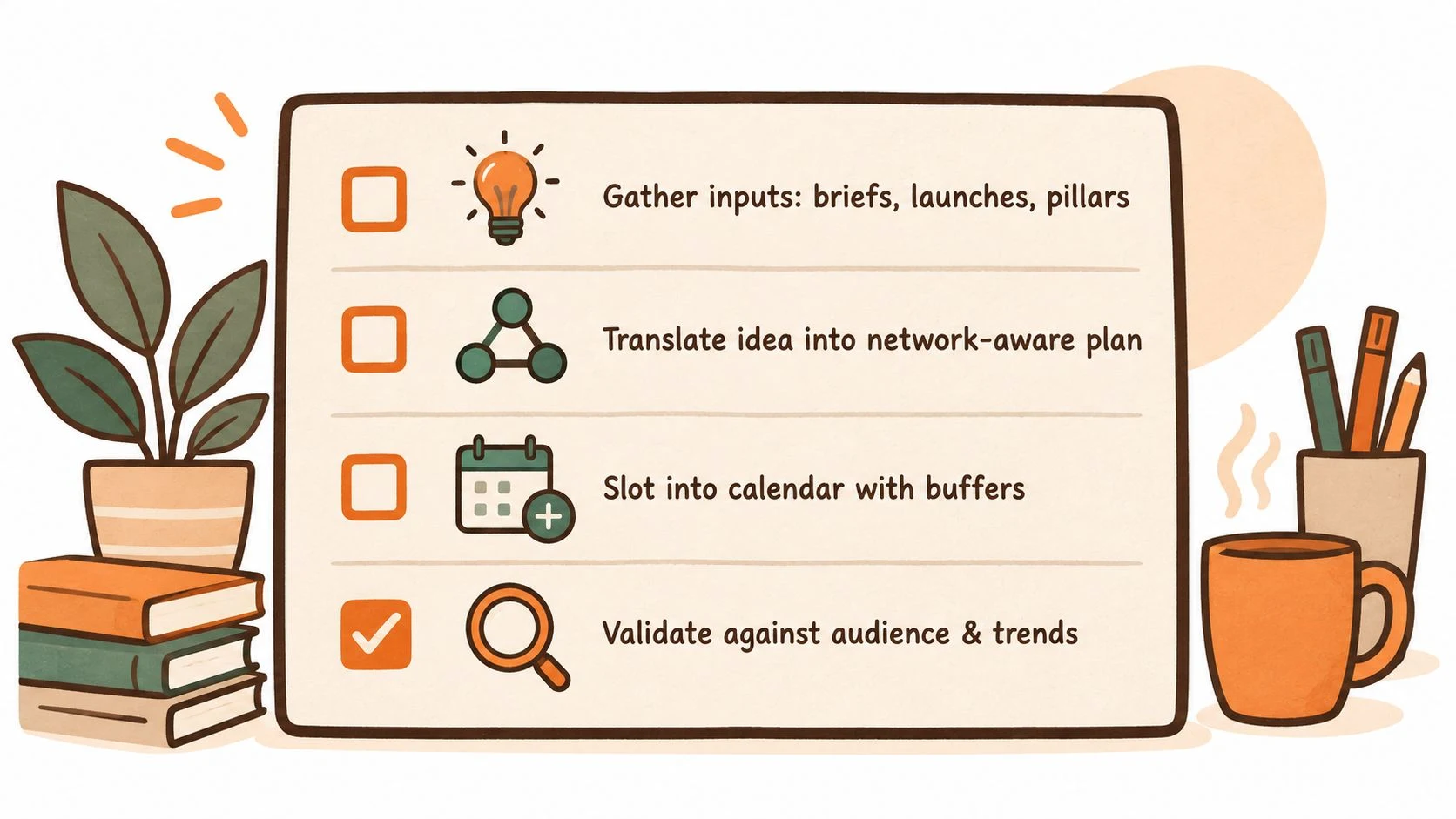
Planning starts with inputs, not captions. Collect campaign briefs, product launches, evergreen content pillars, customer questions, important dates, and reactive opportunities before anyone opens a writing document.
Then turn each idea into a network-aware plan. One product announcement might become a LinkedIn explainer, an Instagram carousel, a short video, an X thread, and a Facebook post. The message stays connected, but the hook, format, CTA, and visual treatment should match the destination.
| Network | Format | Hook | CTA | Owner | Status | Buffer slot |
|---|---|---|---|---|---|---|
| Text or document post | Business problem | Read or discuss | Creator | Draft | Yes | |
| Carousel or Reel | Visual insight | Save or share | Creator | Review | No | |
| TikTok | Short-form video | Immediate tension | Comment or follow | Creator | Planned | Yes |
| Image or video | Community relevance | Visit or respond | Publisher | Approved | No |
Reserve 15 to 20 percent of planned slots for reactive content. That range is a planning convention for protecting flexibility, not a performance guarantee. If every slot is filled with evergreen posts, the team either ignores relevant conversations or creates last-minute work that skips review.
A Donivo-style central composer can sit beside native platform planners, giving the team one shared calendar for drafting and editing while leaving room for native publishing where a platform's own controls are more appropriate. Document the planning model in a reusable social media content plan template, not in a meeting that has to be rebuilt every month.
Before the planning meeting ends, confirm:
- Brief: the objective and audience are clear.
- Network fit: each destination has an appropriate format and angle.
- Ownership: one person owns creation, approval, and publishing for every item.
- Buffers: reactive capacity is visible rather than assumed.
- Dependencies: product, legal, design, and URL requirements are identified.
- Next handoff: the creator knows exactly what “ready to draft” means.
Creation, Approval, and the Asset Pipeline
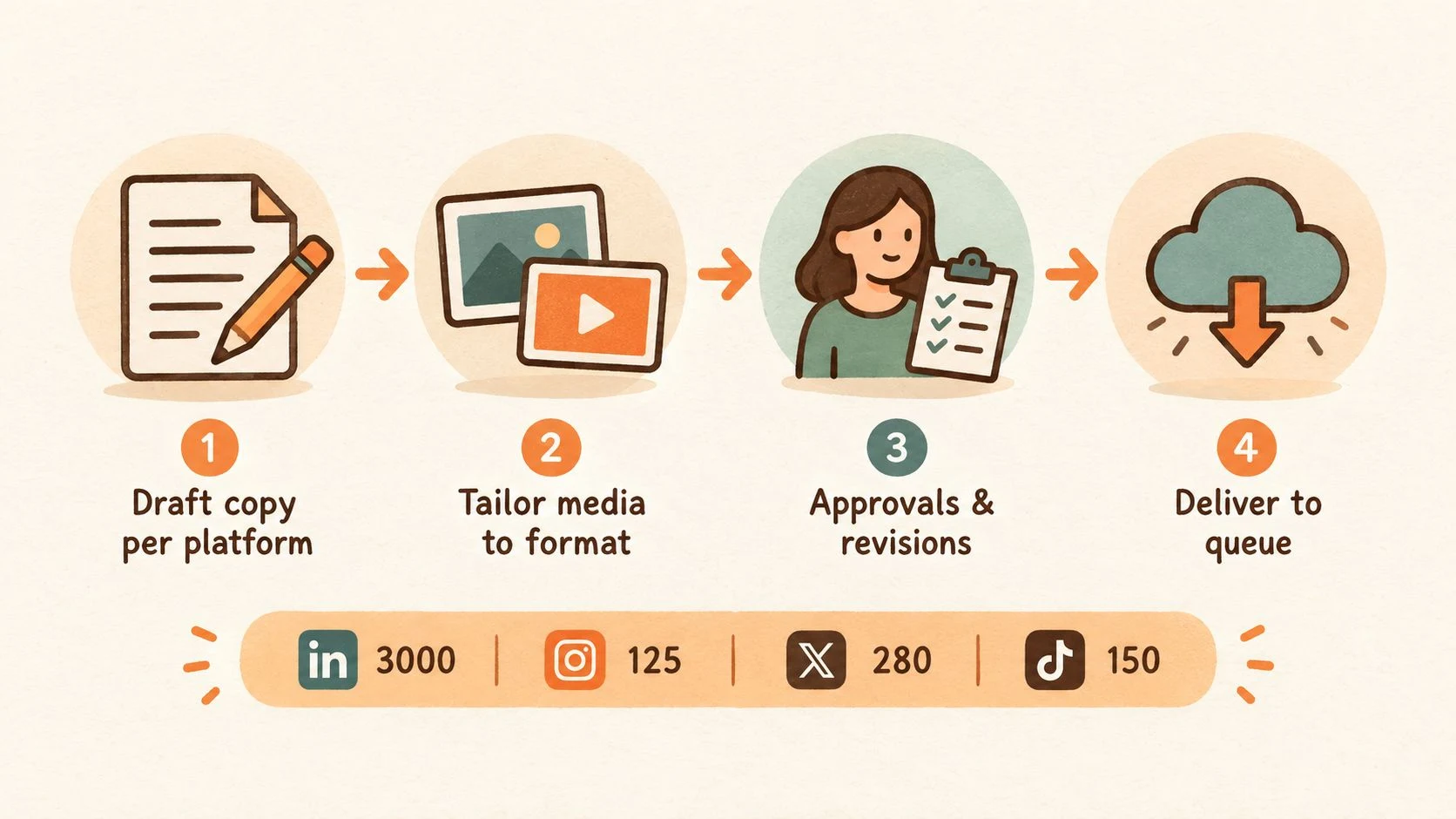
Creation becomes faster when the team adapts one source idea instead of rewriting from an empty page for every network. A long-form insight can produce a carousel, short-form video, quote card, and thread, but repurposing works only when each version is edited for the audience and format.
Platform constraints belong in the brief. The working specifications in this pipeline include a 3,000-character LinkedIn sweet spot, Instagram caption truncation near 125 characters, an X ceiling of 280 characters, TikTok caption guidance of 150 characters, vertical 9:16 media, and 1.91:1 link cards. These are production guardrails, not substitutes for checking the current requirements inside each platform before publishing.
- Brief: objective, audience, key message, CTA, destination, and risk notes.
- Draft: platform-specific copy and a first media treatment.
- Assets folder: source files, exports, thumbnail options, and usage notes.
- Review notes: one consolidated list of requested changes.
- Final: approved copy and final media connected to the calendar item.
- Archive: the approved version, source files, and decision history.
Use predictable names such as client_campaign_network_format_date_v01. Keep buffer content in a separate folder or workspace so a reactive post does not accidentally replace a scheduled campaign asset.
Approval should test the brief
Assign a Creator, Reviewer, Brand Guardian, and Legal reviewer when needed. The reviewer should ask whether the post is accurate, understandable, accessible, correctly formatted, and aligned with the approved brief. The brand guardian checks voice and visual consistency. Legal checks regulated claims, rights, disclosures, and risk.
Avoid feedback such as “I do not like this.” Ask which brief requirement the draft misses. Set a 24-hour turnaround SLA for standard approvals, with a different escalation path for launches or sensitive content. If an approver is unavailable, the workflow should name a backup rather than pause the queue indefinitely.
For practical repurposing rules, use this guide to repurposing content for social media as a reference point, then record the final adaptations inside the asset handoff.
Choosing Where Scheduling Actually Happens
Native schedulers keep you close to the platform. Centralized composers reduce switching between platforms. Neither option wins in every situation.
Meta Business Suite lets users schedule Facebook Page posts by selecting a date and time, edit scheduled posts later, and view items in Week or Month Planner views. Facebook documents a scheduling window from 20 minutes to 29 days in advance in its official scheduling guidance. Meta Business Suite also provides Active times, based on when followers were most active on Facebook and Instagram over the previous 7 days, as documented by Meta's Active times feature.
| Capability | Native platform schedulers | Centralized composer |
|---|---|---|
| Account connection | Directly inside each network | OAuth connections from one workspace, with native publishing available for exceptions |
| Network coverage | Deep control for one platform | Cross-network composition and scheduling |
| Queue logic | Usually platform-specific | Shared queues, calendar slots, and recurring posts |
| Approval layers | Often limited or separate | Can be paired with team review and ownership rules outside the publisher |
| Reporting | Strong native metrics | Cross-network views and consistent tagging |
| Failure handling | Depends on platform alerts | Central retry and notification workflow |
Native tools are sensible when one person manages one account or when a network-specific format needs controls that third-party tools do not expose. A centralized composer becomes more useful as account count and network variety increase. For a broader evaluation of vendors and categories, Sift AI's overview of top social media tools for enterprise provides comparison context.
OAuth-based connections should use authorization tokens rather than stored passwords. Reputable developer guidance recommends storing refresh tokens for connected accounts and creating fresh access tokens at publish time, as explained in this OAuth publishing guide. Pin time zones to the account, not the user's laptop or profile, so a traveling team member cannot shift a campaign by accident.
A practical hybrid is simple. One account can use native scheduling. A small set of accounts benefits from centralized composition with native publishing available for exceptions. A large network mix needs centralized scheduling, tagging, and cross-network reporting. Unsupported networks can still fit through manual reminders, RSS-triggered posts, or webhook bridges. The point is flexibility, not a single mandatory route. Document the handoff in a cross-network scheduling workflow so the team knows when to leave the composer and use the native tool.
Publishing, Queues, and Failed Post Recovery
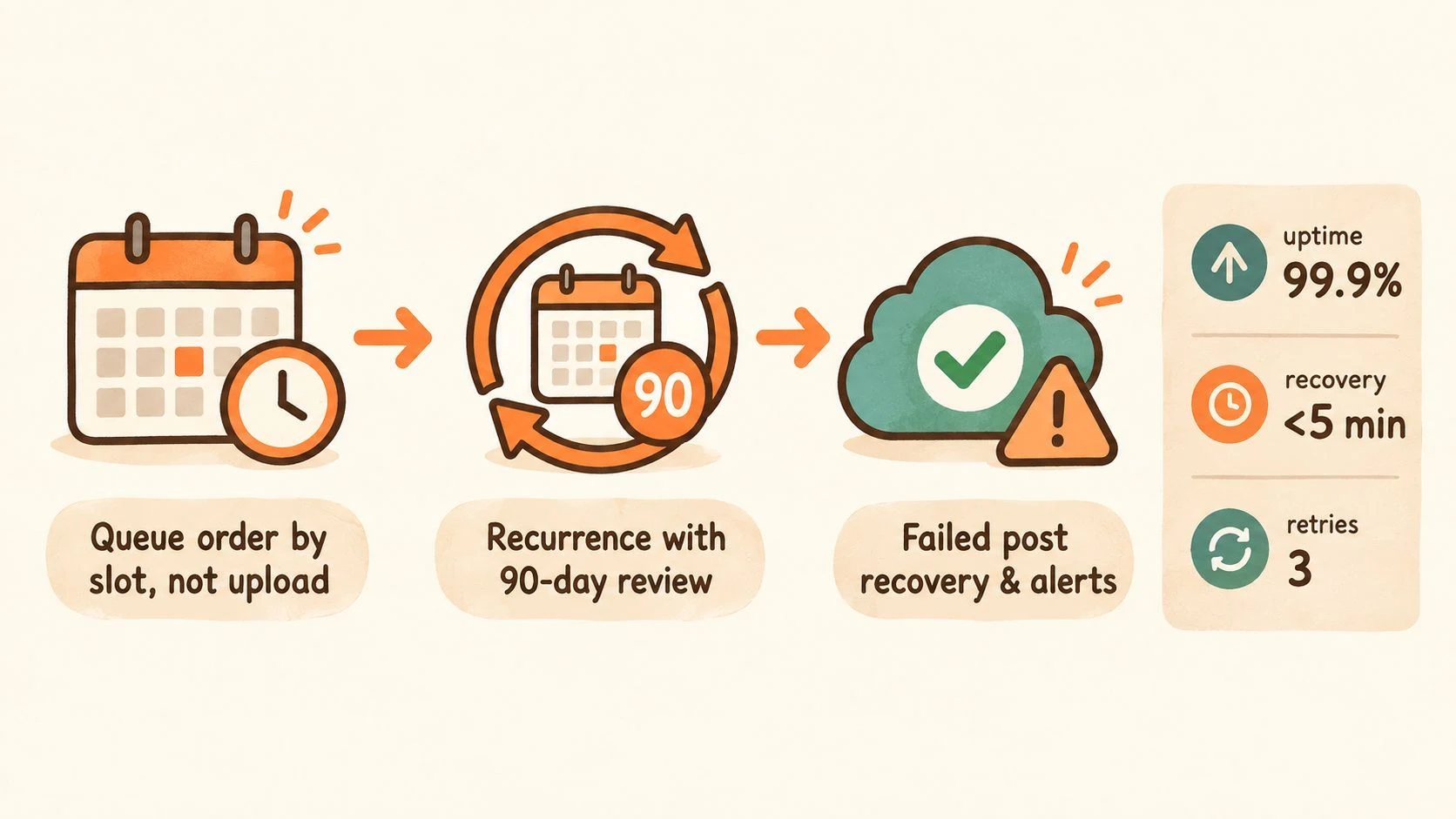
The publisher should follow the calendar slot, not the time an asset was uploaded. If a post is uploaded early, it still belongs in its assigned queue position unless the strategist explicitly changes the schedule.
Evergreen posts need recurrence rules and a review trigger. Set a review every 90 days to check whether the claim, offer, image, link, and audience context remain valid. Pin time zones to the account and keep at least 1 to 2 empty slots per week for reactive content. A scheduling workflow guide also recommends reviewing the queue every Monday morning and Thursday afternoon, pulling the next 7 to 10 days from the calendar, confirming approvals, and avoiding posts to the same channel more often than every 4 hours. Those cadence rules are described in this social media scheduling guide.
Treat failure as an incident
The publishing system should attempt delivery three times, using exponential backoff between attempts. It should capture the platform error code in a failure log and email the assigned owner when all retries fail. If your tool does not provide those controls, create the same behavior with an operations checklist and monitoring alerts.
The recovery runbook should be short enough to use under pressure:
- Verify that the account token is valid.
- Check whether the platform is inside a rate-limit window.
- Read the platform-side rejection reason.
- Correct the asset, copy, permission, or format issue.
- Republish manually if the timing still matters.
- Record the root cause and prevention step.
A one-page incident record should include the account, intended slot, post ID, failure time, error message, owner, recovery action, final publication time, and follow-up change. For Facebook-specific scheduling instructions, keep the Facebook post scheduling guide available to the publisher.
A failed post should create a visible task, not a mystery. The recovery path is part of the workflow's design, not an emergency add-on.
Monitoring, Reporting, and the Weekly Review Loop
Publishing is not the finish line. The community manager owns a daily inbox sweep for comments and DMs, while brand mentions need a defined response window during business hours. Use a four-hour gap rule for checking mentions, then apply a tagged escalation path for complaints involving safety, legal exposure, privacy, or reputational risk.
The analyst and strategist should operate on two review points. Monday morning is for reviewing the previous week's results and pulling lessons into the queue. Thursday afternoon is for checking the upcoming calendar, catching missing assets or approvals, and adjusting before a deadline becomes a crisis.
Keep the weekly report narrow:
- Reach: how many people encountered the content.
- Engagement rate: how actively audiences interacted with it. The engagement rate calculator can help standardize the calculation.
- Click-throughs: whether the post created a measurable next action.
- Follower delta: whether the account gained or lost followers during the period.
- Qualitative notes: wins, misses, audience questions, and useful objections.
A timing study on social content found that publication timing affects performance, with the strongest gains coming from matching publication to audience receptivity rather than increasing volume. That matters for global accounts, where audience activity varies across time zones and daily routines. The finding is discussed in the peer-reviewed scheduling study.
Measure AI inside the process
AI-assisted work should be evaluated through workflow outcomes, not the number of drafts produced. Track cycle time per post, approval turnaround, repurposing ratio, and post-publish error rate. If AI makes the team faster but creates more corrections, rejected claims, or off-brand edits, the workflow has not improved.
The measurement gap is significant. A 2025 global study found that 96% of social media professionals use AI tools, while 45% cited content-quality concerns and 36% said they do not track or do not know how AI-generated content performs versus non-AI content. HubSpot's 2026 report found that 94% of marketers use AI somewhere in their workflow, but only 36% described their current technology stack as very cohesive or fully integrated. These figures appear in the Metricool State of AI Social Media report.
End each weekly review with a written retro:
- What shipped cleanly?
- Where did the handoff slow down?
- Which post created useful audience response?
- Which format or message should be repeated?
- What should be removed from the next cycle?
- Which workflow rule needs revision?
Rolling Out the Workflow in 30, 60, and 90 Days
Do not redesign every process before publishing another post. Roll out the system in stages, using live but low-risk content to expose weak handoffs.
Days 1 to 30
Lock the roles first. Write the content brief template, build the first two-week calendar, define the approval owner and backup, and connect active accounts through a central composer such as Donivo. Test OAuth tokens, account-level time zones, queue behavior, and retry notifications on ordinary posts before a launch depends on them.
The first month should produce five artifacts:
- Role document: owner and backup for every stage.
- Brief template: objective, audience, hook, CTA, format, risk, and destination.
- Two-week calendar: planned posts, owners, statuses, and buffer slots.
- Account register: connected profiles, time zones, and publishing permissions.
- Failure log: a place to record rejected or missed posts.
Days 31 to 60
Formalize the approval chain and asset handoff. Require one consolidated review note instead of scattered comments across email and chat. Run a failure-recovery drill by intentionally walking the team through token verification, platform rejection checks, manual republishing, and root-cause logging.
Start the baseline report with the agreed KPI set. Do not add every metric available in a dashboard. A small report that leads to a decision is more useful than a large report nobody reads.
Days 61 to 90
Tune cadence based on evidence from the weekly reviews. Retire features nobody uses, simplify fields that create duplicate work, and document playbooks for reactive posts, crisis replies, and platform outages. The workflow should become easier to follow, not more elaborate.
Meltwater's 2025 global social report identified team bandwidth as the biggest obstacle, with limited video capabilities, no dedicated social manager, and no established process also ranking among major roadblocks. A 2025 summary reported that publishing volume fell from 2023 to 2024 while engagement rose by nearly 20%, supporting a quality-over- quantity interpretation rather than a demand for maximum output. The source material is available in the 2025 State of Social Global Report.
FAQ for lean teams
Keep the role document, brief template, approval SLA, recovery runbook, and weekly report template in one accessible location. Those documents make the system resilient when someone is sick, a client changes direction, or a platform goes down.
Donivo is designed for the publishing handoff. You can start posting free when you want one place to connect accounts, tailor versions, and publish across supported networks. Read the practical social media scheduling guide for the native, hybrid, and consolidated setup decision. When a link needs campaign tracking, use the UTM builder before the post enters Review. Before the final version is scheduled, run it through the social media publishing checklist.
Apply the same workflow to the work in front of you. See how agencies separate client publishing, how small businesses build a manageable weekly rhythm, and how property managers organize public updates.
A good social media management workflow does not make every post identical. It makes the important decisions visible, gives each handoff an owner, and closes the loop after publication. That is enough structure to help a solo publisher or lean team publish consistently without turning the work into bureaucracy.