10 Social Media Post Ideas That Build Momentum
·25 min read
5.24 billion active social media user identities existed worldwide at the start of 2025, and people spend over 15 billion hours consuming social content each day. The strongest social media post ideas turn that enormous attention environment into a repeatable system, not a pile of disconnected prompts.
Good distribution starts by matching a message to the right audience, platform, format, timing, and follow-up. That means preparing the idea, choosing the channel, adapting the asset, previewing the final post, scheduling it, and verifying that it published correctly.
Copying one identical post everywhere usually wastes the strengths of each network. A behind-the-scenes clip may work as a short vertical video on TikTok, a concise story on Instagram, a team lesson on LinkedIn, and a visual update on Facebook. The subject can stay consistent, but the hook, length, caption, call to action, and media treatment should change.
Social media now operates at near-universal scale. DataReportal reports that 97.3% of connected adults used at least one social network or messaging platform each month, while social media adoption reached 94.2% of internet users at the start of 2025. DataReportal's Digital 2025 overview also identifies YouTube as the most used platform, reinforcing the need for channel-specific adaptation.
The 10 formats below give creators, small teams, and agencies a balanced mix of trust, education, participation, timeliness, and conversion content. A platform such as Donivo can coordinate connected accounts, queues, calendars, previews, and publishing across networks, but scheduling only executes a strategy. It doesn't decide what your audience needs next.
1. Behind-the-Scenes Content Series
Behind-the-scenes posts make invisible work visible. A creator can show a studio setup, a nonprofit can document event preparation, and an agency can share a carefully selected moment from a team brainstorm or client milestone. The format works because the audience sees process rather than only the polished result.
The strongest version has a recurring angle. “How we make it” suits a product business, “studio notes” suits a creator, and “field journal” suits a nonprofit. A recurring label helps the team produce the idea consistently without making every post feel identical.
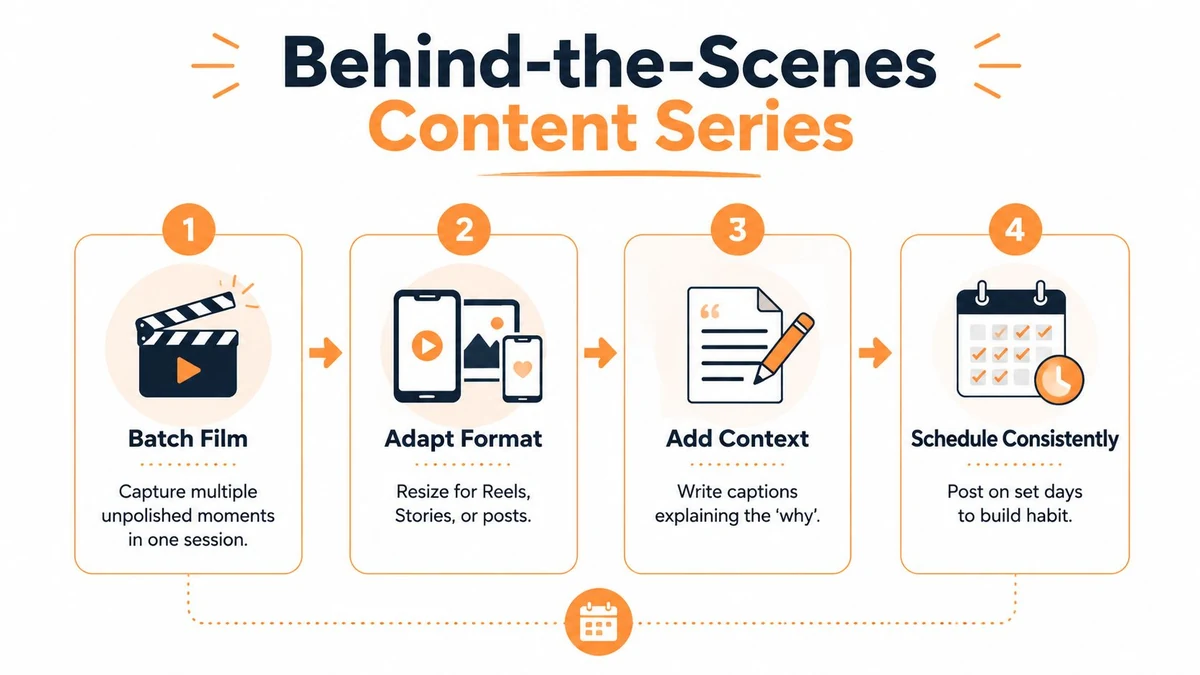
Capture several moments during one working session instead of reaching for the camera every day. Film the setup, a decision point, a small obstacle, and the finished step. Then write captions that explain why the team made a choice, not merely what appears on screen.
Practical rule: Show enough process to build trust, but remove confidential information, private customer details, and anything your team hasn't approved for publication.
Adapt the process to each network
Use the same source footage differently. A vertical clip can become a Reel, TikTok, or Short. A still image with a reflective caption may suit LinkedIn, while a short sequence of updates can work in Stories. A multi-network composer helps reduce repetitive uploading, but each caption should still sound native to its destination.
A simple visual workflow can keep production focused:
- Capture: Record setup, decisions, and progress in one session.
- Explain: Add the reason behind the process in the caption.
- Review: Remove private, sensitive, or distracting details.
- Schedule: Place the series on a predictable day or recurring queue slot.
- Learn: Compare replies, shares, saves, and reach to identify the strongest process angles.
For example, an agency might turn one campaign workshop into a short video, a LinkedIn lesson about decision-making, and a Story poll asking which concept the audience would explore. The content remains connected, but the audience receives a useful native experience on each platform.

2. Educational Carousel Posts
A strong educational carousel answers one audience question in a sequence people can follow and save. A marketing educator can break down an ad campaign, a fitness coach can demonstrate exercise form, and a B2B software company can explain a product workflow. Nonprofits can show how donations support a program, as long as each claim is documented and easy to understand.
Choose the question before opening a design file. “How do I plan a launch?” creates a clearer lesson than “What should we post this week?” Give each slide one job: frame the problem, explain a step, show an example, or direct the reader toward an action. The opening slide should make the benefit clear, while the final slide should offer a practical next step.
Use consistent typography, colors, and spacing so related posts are recognizable. For feed graphics, design at 1080 pixels wide. Vertical feed posts can use 1080 × 1350 px, square posts 1080 × 1080 px, and full-screen formats 1080 × 1920 px. LinkedIn feed images can use 1200 × 1200 px, with link previews at 1200 × 627 px.
Shape the lesson for each channel
A carousel should teach one focused idea, not compress an entire ebook into slides. Put the clearest promise first, keep the middle slides readable, and make the final action specific. A reader should grasp the sequence from the visual headlines, even without studying every caption.
Channel choice depends on intent. LinkedIn suits a professional framework or workflow. Instagram favors a saveable visual explanation, while a short-form video channel may benefit from turning each slide into a narrated clip. Adapt the presentation rather than uploading the same file everywhere.
A practical review pass checks:
- Clarity: Can the audience identify the question and answer quickly?
- Readability: Are text size, contrast, cropping, and slide order suitable for mobile viewing?
- Distribution: Which channel matches the lesson and audience intent?
- Repurposing: Can the slides become a short video, LinkedIn document, or text thread?
- Measurement: Track saves, shares, comments, reach, and clicks against the post's purpose.
A SaaS team might publish a workflow carousel on LinkedIn, convert its steps into vertical clips, and use the final prompt to invite a product demonstration. Schedule the approved carousel when the audience is likely to plan or learn, then place its adapted versions into separate channel queues.
Use these social media content ideas to find related angles, then filter them through audience questions and buying stage.
3. User-Generated Content Reposts
User-generated content gives customers a visible role in the brand story. An ecommerce company might repost a product photo, a coach may share an approved progress update, and a software company can feature a customer explaining a practical use case. Fan art, community memes, and thoughtful replies can also become useful community assets.
The trade-off is control. UGC can feel more credible because it retains the creator's perspective, yet lighting, framing, language, and brand presentation may vary. Preserve the reason the post mattered instead of editing it until it resembles an advertisement. Add context, credit the original author, and match the format to the channel.
Permission protects both reach and relationships. Search mentions, review tagged posts, and invite submissions when you need a specific use case. Before publication, confirm ownership, request permission in writing, explain possible destinations, and store the approval with the asset.
Build UGC into distribution
Start with the source, then decide where the approved asset can do useful work. A customer video may suit TikTok or Instagram Reels, a quote can support a LinkedIn post, and a product image may work in a community update. Each adaptation should preserve the creator's meaning and meet the channel's viewing habits.
Use this workflow:
- Source: Monitor hashtags, mentions, tags, reviews, and direct submissions.
- Verify: Confirm ownership and permission before scheduling.
- Credit: Tag the creator clearly and identify the customer context.
- Adapt: Edit approved material for Stories, short video, carousels, or email without changing its meaning.
- Balance: Pair UGC with original education, product information, and brand updates.
- Measure: Compare replies, shares, saves, clicks, and qualified conversations with the post's purpose.
A fitness coach might turn one approved client video into a testimonial Reel, a caption-based lesson about consistency, and a Story response to common questions. Repurposing content for social media works best when the original permission covers each intended destination.
Schedule the strongest version when the relevant audience is ready to engage, then queue adaptations separately. Keep a record of consent, usage limits, and expiry instructions so a later campaign does not reuse material outside the agreed scope.
4. Trending Sound and Trend Participation Posts
Trend participation can introduce a brand to an existing conversation on TikTok, Instagram Reels, and YouTube Shorts. The format suits quick demonstrations, reactions, workplace humor, and expectation-versus-reality scenarios. A product brand could build a popular sound around its mascot, while a service provider could use the format to show a familiar customer problem.
The strategic test is relevance. A trend may generate attention, yet a forced connection can weaken credibility. Start with the audience intent: what should viewers understand, feel, or recognize after watching? If the answer is unclear, skip the trend.
Channel fit shapes the execution. Short video needs a strong opening and readable on-screen context, while the same idea may work as a carousel only after the joke or visual structure is rewritten. Before filming, draft several angles around one format: a customer problem, a product demonstration, and an internal team reaction. This creates adaptation options without inventing a separate concept for every channel.
Build a fast approval and distribution loop
Monitor discovery tabs and creator feeds, then record the sound, visual pattern, audience expectation, and expiry risk. A compact review process should confirm:
- Relevance: Does the trend connect to a real customer, product, or industry situation?
- Rights: Can the sound, footage, and other elements be used on the selected channel?
- Voice: Does the adaptation sound like the brand rather than a copied account?
- Timing: Is immediate publishing necessary, or can the post be scheduled?
- Risk: Should sensitive news, cultural moments, or unclear ownership be excluded?
Publish the strongest channel-native version while the format still has momentum. Queue lower-risk adaptations separately, such as a caption lesson, a Story explanation, or a text-based industry observation. Reuse the underlying insight, not the trend unchanged.
An independent designer might contrast a rushed brief with a clear one through a popular format. Track retention, shares, saves, profile visits, and qualified conversations against the post's purpose. Archive successful structures as reusable templates, with notes on approval limits and why the audience responded.
5. Polled and Interactive Question Posts
Interactive posts turn publishing into a feedback channel. A creator can ask followers to choose the next project, an ecommerce brand can test product preferences, a B2B company can identify a recurring industry problem, and an agency can collect reactions to design directions. The format works when the audience intent is clear: quick participation, useful advice, or a decision they can influence.
Start with a response path that takes little effort. “What do you think?” asks people to create the topic themselves. “Which onboarding step causes the most friction, setup, training, or reporting?” offers defined choices and produces language the team can reuse in content, FAQs, landing pages, or product explanations.
Channel choice affects the depth of the answer. Stories suit fast multiple-choice polls and ratings. Captions, text posts, and community spaces leave room for reasons, examples, and disagreement. Adapt the same question to each channel instead of copying the wording unchanged.
The response plan matters as much as the prompt. Ask one specific question, review poll results alongside comments, respond to useful replies, and record recurring themes. If the audience votes on a decision, share the result and state what happens next. Do not ask for input on a choice that has already been settled.
A nonprofit, for example, might ask supporters to choose between volunteering, fundraising, and educational resources. The follow-up can summarize the response, explain the organization's next action, and direct each group to a relevant resource. That second post can become a short video, a carousel of findings, or a caption answering the most common question.
Schedule the poll when people can act on it, then set a review date before publishing. Track responses, completion, comments, saves, profile visits, and qualified follow-up actions according to the post's purpose. Remove sensitive questions, protect personal details, and treat feedback as directional evidence rather than a complete representation of the audience.
6. Storytelling and Narrative-Driven Posts
Storytelling gives information a clear human sequence. Start with a situation, show the problem or constraint, explain the decision, then close with an accurate outcome and lesson. Entrepreneurs might describe a failure that changed their process, nonprofits can share a participant's experience with permission, and creators can document a challenge that altered their working method.
The opening needs tension. “We launched successfully” offers little reason to keep reading. A missed assumption, unexpected limitation, or difficult choice creates a question the audience wants answered. The ending should identify what changed and which part the reader can apply.
Customer stories need tighter controls. Secure approval, preserve the documented context, and avoid presenting one experience as a universal promise. A B2B case study can use a narrative structure while keeping its evidence and outcome precise.
Build a story that travels across channels
Choose the format according to audience intent. A thread suits sequential explanation, a carousel supports concise visual steps, and a short video can carry emotion through voice and action. Adapt the opening, pacing, and call to action for each channel instead of copying one version everywhere.
Use this working outline:
- Situation: What did the person, team, or customer need?
- Friction: What made the problem difficult?
- Decision: Which action changed the direction?
- Outcome: What happened, stated accurately?
- Lesson: What can the audience apply?
An agency could document a redesign that began with conflicting stakeholder requests. The first post presents the confusion, the next explains the prioritization method, and the final shows the approved direction while asking readers about their process. The same material can become a carousel, video script, or longer article, but each version should stand alone for people who discover it later.
Schedule connected posts close enough to preserve momentum, then leave room to review replies before publishing the next installment. Track completion, saves, comments, profile visits, and qualified inquiries based on the story's purpose. Keep sensitive details out of public posts, and obtain permission before identifying customers or participants.
7. Timely News and Trend Commentary Posts
Timely commentary earns attention only when it helps people decide what to do next. A marketing strategist might translate a platform change into content-planning implications, a technology founder might examine an industry acquisition, and a nonprofit might explain how a policy development affects its mission.
Start with the audience's decision, then choose the channel. A short post can state the change and its immediate consequence, while a carousel can separate confirmed facts, practical implications, and questions for leaders. A video suits a clear explanation, but its script needs tighter verification because an error is harder to correct once published.
Speed creates a verification risk. Check the date, context, original announcement, and source before writing. Name and link the original reporting or primary source where appropriate. Mark confirmed information separately from analysis, opinion, and forecasts. If the central claim remains unverified, delay the commentary and publish evergreen material instead.
Your point of view can take several forms:
- Practical explanation: Show how the change affects a specific audience.
- Counterargument: Test the common interpretation against another consequence.
- Forecast: Label the projection and identify what could change it.
- Decision questions: Give leaders criteria to review before acting.
A B2B agency responding to a product announcement could explain which workflow changes immediately and which does not. That gives readers a decision aid instead of another copy of the headline.
Set a publishing rule before the story breaks
Assign fact-checking, approval for sensitive wording, and topics that require a delay. Keep a measured ratio of timely commentary and evergreen education so the calendar does not depend on news. Repurpose a verified analysis into a channel-specific post, a short video outline, or a team briefing, but update the wording if the facts change.
Track saves, qualified replies, profile visits, and inquiries according to the post's purpose. Remove claims that cannot be supported, correct errors visibly, and avoid publishing private or identifying details without permission.
8. Value-Packed Tips and Micro-Lessons Posts
Micro-lessons work when they solve one small problem quickly. A designer might share a Figma shortcut, a trainer demonstrate a warm-up drill, a productivity educator show one planning adjustment, or a marketer improve an email subject line. Each example serves an audience with a specific intent, so the format should begin with the problem rather than a broad topic.
Keep the promise narrow. “How to improve your marketing” gives a short post too much to cover. “How to find the missing action in a landing-page headline” sets a clear teaching task and a clear reason to stop scrolling.
Choose the channel based on how the lesson is easiest to consume. Use short on-screen text for video, one visible idea for an image, and a concise caption for context. A creator can publish one tip weekly, while an agency can rotate subject-matter owners. Before scheduling, check mobile layout, character length, and whether the instruction remains understandable without sound.
Turn one lesson into a repeatable distribution unit
Build each post around five decisions:
- Problem: Name the moment when the audience gets stuck.
- Action: Give one step they can try immediately.
- Example: Show that step in a realistic scenario.
- Prompt: Invite a question, response, or test result.
- Reuse: Save strong lessons for a carousel, newsletter, video, or team resource.
An agency could teach marketers to replace a vague call to action with a specific next step. The lesson can become a short talking-head video for one channel, a LinkedIn text post for discussion, and a carousel comparing weak and stronger examples. Adapt the wording and visual density instead of copying the same post everywhere.
Measure the outcome that matches the intent. Saves and completed views can indicate reference value, while replies, profile visits, or inquiries may show stronger consideration. Retire tips that attract attention but produce no useful action, and keep the clearest lessons in a library for planned reuse.
9. Milestone and Celebration Posts
A milestone post earns attention when followers can see their place in the achievement. Anniversaries, launches, awards, customer wins, and community contributions all offer useful reasons to celebrate. Put the people behind the progress at the center, including customers, staff, suppliers, partners, or supporters.
The milestone itself needs context. Explain what changed, why it matters, and what the team learned. A business marking its first year might thank customers, suppliers, and employees. A nonprofit can connect supporter contributions to its mission while protecting the privacy of the people it serves.
Choose the channel according to the participation you want. Use a photo or short video for visible emotion, a carousel for several contributors or lessons, and Stories for questions, memories, or event updates. Prepare approved visuals, confirm names and permissions, and check that every person shown has agreed to the use.
Keep the celebration separate from a routine sales announcement. A thank-you, team image, customer message, or invitation to share a memory gives the update a communal purpose. If an offer or event follows, explain its connection to the milestone instead of attaching an unrelated promotion.
Turn one occasion into a distribution plan
Before publishing, decide how the moment will travel across channels:
- Recognize: State the achievement plainly.
- Credit: Name the people and communities involved.
- Explain: Connect the milestone to a real outcome or lesson.
- Invite: Ask for a memory, response, or contribution.
- Continue: Show the next meaningful step.
Seasonal and awareness occasions can fill calendar gaps when they fit the audience and brand. Donivo's Social Media Holidays calendar helps with advance planning, but relevance should determine which occasions receive a post.
A creator celebrating an audience milestone could ask which tutorial helped followers most, then compile the answers into a follow-up post. A small team might adapt the same responses into a short video, a customer-focused caption, and an internal insight for future planning. Track replies, shares, profile visits, or inquiries according to the post's purpose, and retain permission records before repurposing anyone's contribution.
10. Before-and-After and Transformation Posts
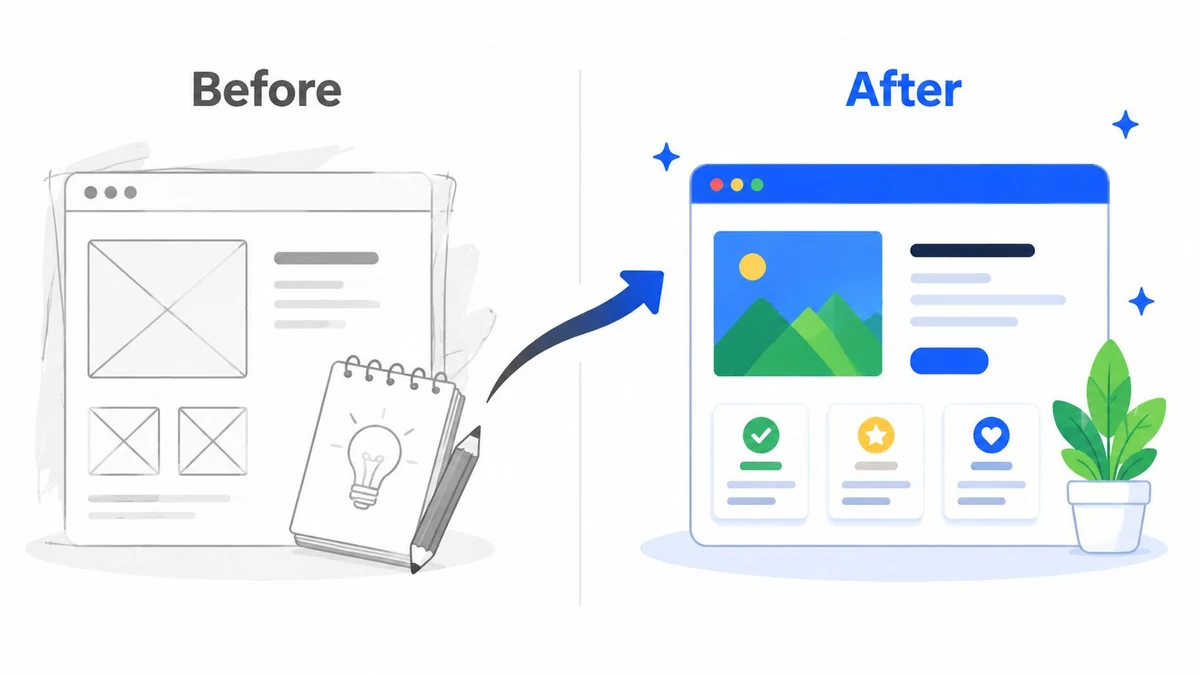
A strong before-and-after post makes progress visible before the audience reads the caption. Show a website redesign, renovation stages, workflow change, or improvement to a community space, then explain what caused the difference.
The comparison needs context. Include relevant dates, conditions, and the method used to assess the result, so viewers can judge the change fairly. If another person appears, secure explicit permission. Personal outcomes should remain examples, not promises.
For performance-led campaigns, anchor the post to one central KPI. Dash Social's Rare Beauty case study highlights a practical approach: make the result easy to scan, pair the transformation with a short testimonial or visual evidence, and adapt the story for visual platforms or B2B channels.
Design the proof before choosing the format
Start with the evidence, then select the channel. A side-by-side image suits Instagram, while a carousel can reveal the starting point, decision, and result in sequence. A short screen recording works for interface changes. LinkedIn may suit a project explanation for professional audiences.
Keep the comparison consistent. Match framing, lighting, camera position, labels, and order where possible. One visible change should lead the post. Place supporting detail in the caption or case study rather than crowding the image with competing claims.
Use this editorial check before scheduling:
- Starting point: Record the original condition and relevant dates.
- Focus: Identify the one change viewers should notice.
- Proof: Add a verified metric, customer statement, or observable result.
- Review: Check permissions, claims, and brand safety.
- Repurpose: Adapt the approved evidence into a carousel, short video, or professional case study.
A web designer could show the original homepage, the research-led revision, and the reasoning behind one major change. Schedule the visual post for discovery, then reuse the explanation for consideration. Track saves, shares, profile visits, or inquiries according to the post's purpose, and keep permission records with the source files.
Comparison of 10 Social Media Post Ideas
| Post Type | Implementation Complexity | Resource Requirements | Expected Outcomes | Ideal Use Cases | Key Advantages |
|---|---|---|---|---|---|
| Behind-the-Scenes Content Series | Low–Medium, recurring capture & curation | Low, phone + basic editing | Builds trust; steady engagement | Brands/creators seeking authenticity & culture | Authentic connection; low production cost |
| Educational Carousel Posts | Medium, slide design & sequencing | Medium, design tools & templates | Authority-building; longer time-on-post | B2B, educators, step-by-step tutorials | Positions as expert; highly repurposable |
| User-Generated Content Reposts | Low–Medium, sourcing & permissions | Low, community-sourced content & vetting | Strong social proof; higher engagement | E-commerce, community-driven brands, nonprofits | Authentic proof; reduces content workload |
| Trending Sound / Trend Participation Posts | Medium–High, rapid adaptation & timing | Low, quick production but high monitoring | Short-term viral reach & engagement spikes | Agile consumer brands; entertainment-focused accounts | Fast algorithmic visibility when timely |
| Polled or Interactive Question Posts | Low, simple formats (polls/q's) | Low, platform tools; needs moderation | Increased comments; direct audience insights | Community-building, product feedback, research | Drives participation; yields actionable feedback |
| Storytelling / Narrative-Driven Posts | Medium–High, craft and structure required | Medium, writing, visuals, planning time | Deep emotional connection; shareability | Personal brands, nonprofits, case-study campaigns | Memorable persuasion; builds loyalty |
| Timely News or Trend Commentary Posts | Medium, constant monitoring & analysis | Low–Medium, research + quick publishing | Thought leadership; engagement if timely | LinkedIn, industry experts, B2B commentators | Positions you as informed authority |
| Value-Packed Tips / Micro-Lessons Posts | Low, single takeaway format | Low, quick to produce; simple visuals | High shares & saves; builds helpful reputation | Coaches, productivity creators, SaaS teams | Immediately actionable; highly shareable |
| Milestone or Celebration Posts | Low, announcement-focused | Low, simple graphics & copy | Positive sentiment; community goodwill | Startups, creators, nonprofits marking wins | Generates supportive engagement & loyalty |
| Before-and-After / Transformation Posts | Low–Medium, timing, permissions, prep | Medium, quality visuals + metrics | Clear proof of impact; strong credibility | Fitness, design, renovations, case studies | Visual proof of results; highly persuasive |
Build the Calendar Around Intent, Not Volume
A full calendar isn't automatically a good calendar. Start by assigning every post a job. A behind-the-scenes series may support trust, a micro-lesson may support saves and shares, an interactive question may support audience research, and a transformation post may support evaluation. The format should follow the intended action, not the other way around.
Before an idea enters production, record the essentials:
- Goal: Define whether the post supports awareness, trust, education, participation, traffic, leads, or conversion.
- Audience: Identify the specific group and problem, not merely “followers.”
- Platform: Choose where the audience and format fit.
- Adaptation: Write the platform-specific hook, caption, dimensions, and call to action.
- Owner: Name the person responsible for creation and replies.
- Approval: Set the legal, client, brand, or privacy check required.
- Publish window: Select a tested time range and account for urgency.
- Repurposing destination: Decide whether the asset becomes a Short, Reel, carousel, thread, newsletter segment, or blog support post.
- Primary KPI: Choose the main measure before publication.
Default timing can help when you don't have enough account history. Recent benchmark guidance identifies weekday mid-mornings as a broad starting point, with Tuesday through Thursday around 9 a.m. to 1 p.m. local time emerging as a cross-platform window in Apaya's 2026 scheduling overview. Treat that as a test window, not a universal answer. A review from the London School of Economics concludes that no single global best time exists, because audience behavior differs across networks and communities.
Use a workflow that matches team size
A solo creator can maintain a simple idea bank, a weekly batch session, and a queue with clearly labeled formats. The creator should reserve time for replies and review, because publishing without follow-up leaves useful audience information unused.
A small team benefits from a shared calendar with owners, status labels, approval notes, asset links, and a recovery plan for failed posts. An agency needs separate client workspaces, account permissions, recurring queues, and a consistent naming system so one client's content never enters another client's workflow.
Donivo is one scheduling option for this operating model. Its centralized composer supports publishing across Facebook, Instagram, X, YouTube, TikTok, LinkedIn, Threads, and Bluesky, while queue and calendar scheduling support specific times and recurring slots. The platform also provides automatic retries and email alerts for failed publishes, previews, a UTM Link Builder, and transparent limits across its plans. Its multi-workspace structure can suit personal, team, and agency planning, but every team should choose a plan based on the number of workspaces, accounts, and posts it manages.
Measure the job the post was hired to do
Review performance before repeating a format. Reach helps evaluate distribution, while saves and shares often indicate practical usefulness. Comments and replies reveal conversation quality, clicks show movement toward a destination, and conversions matter when the post has a clear commercial or registration path. Publishing reliability also belongs in the review, especially for scheduled campaigns and client work.
Don't compare every format with the same scoreboard. A poll may be valuable because it reveals a recurring customer concern. A case study may earn fewer public reactions while helping a qualified prospect understand the offer. A trend post may create timely awareness but have a short useful life. Record the result, the context, and the next adjustment.
Aim for a mix of evergreen and timely content. Evergreen carousels, micro-lessons, UGC, and behind-the-scenes series can keep the calendar stable. Trend participation and news commentary add responsiveness, but they need a faster approval route and a clear risk boundary. When a post touches customer privacy, sensitive events, permissions, or unverified claims, delay is often cheaper than correction.
The practical objective isn't maximum volume. It's a dependable system that turns audience intent into appropriate content, distributes each asset where it makes sense, learns from the response, and makes the next publishing decision easier.
Donivo brings connected-network publishing, calendar and queue scheduling, previews, retries, email alerts, multi-workspace planning, and practical tools such as the UTM Link Builder and Image Size Cheat Sheet into one workflow. Visit Donivo to organize your social media post ideas and turn the strongest formats into a reliable publishing queue.