Social Media Management for Instagram: Complete Guide
·18 min read

Monday can begin with good intentions and still turn into a scramble. Drafts arrive in a shared folder, the community queue is full, a Reel lands in the wrong slot, and someone needs a performance report before the next caption is approved.
That is not a content shortage. It is a social media management Instagram workflow problem. Instagram grew from its launch on October 6, 2010, to a platform that Britannica says passed 2 billion monthly active users in 2022. Its unusually fast early adoption, from 25,000 users on the first day to 1 million in less than three months, made publishing discipline an operating requirement. See Britannica's Instagram history for that background.
The practical answer is to manage Instagram as a pipeline. Strategy determines what deserves production, production creates approved assets, publishing delivers them reliably, community care keeps conversations moving, and measurement decides what earns another slot.
The Instagram Management Pipeline You Actually Need
A reliable Instagram operation has five connected stages: strategy, planning, production, publishing, and care. Analysis sits across all five because the next calendar should change when the evidence changes.
| Stage | Owner | Deliverable |
|---|---|---|
| Strategy | Strategist or account owner | A primary goal, audience tension, content pillars, and one useful success signal. |
| Planning | Calendar owner | A weekly grid with format, campaign, owner, deadline, time zone, and buffer capacity. |
| Production | Writer, designer, or creator | An approved asset bundle with the master file, export, caption, cover, and accessibility checks. |
| Publishing | Publishing owner | A scheduled queue with the correct account, format, time, media, and delivery check. |
| Care | Community owner | A defined response sweep for comments, mentions, Story replies, and relevant messages. |
The pipeline usually breaks at the handoffs. The person responsible for the calendar may assume the copywriter owns the caption, while the copywriter thinks the strategist supplied the angle. Stories with interactive elements can skip the normal review because they feel temporary. Community response gets pushed to the end of the day, where it competes with reporting and client work.
Practical rule: Every post should have one named owner for the calendar entry and one named approver for the final asset.
Cadence should reflect capacity, not ambition. A large cross-account analysis reported that publishing 3 to 5 times per week can materially improve reach and follower growth compared with lower-frequency posting. The published analysis covered by Social Media Today also reports a 24% reach lift at 10 posts per week. Treat those figures as directional benchmarks, not permission to flood the feed.
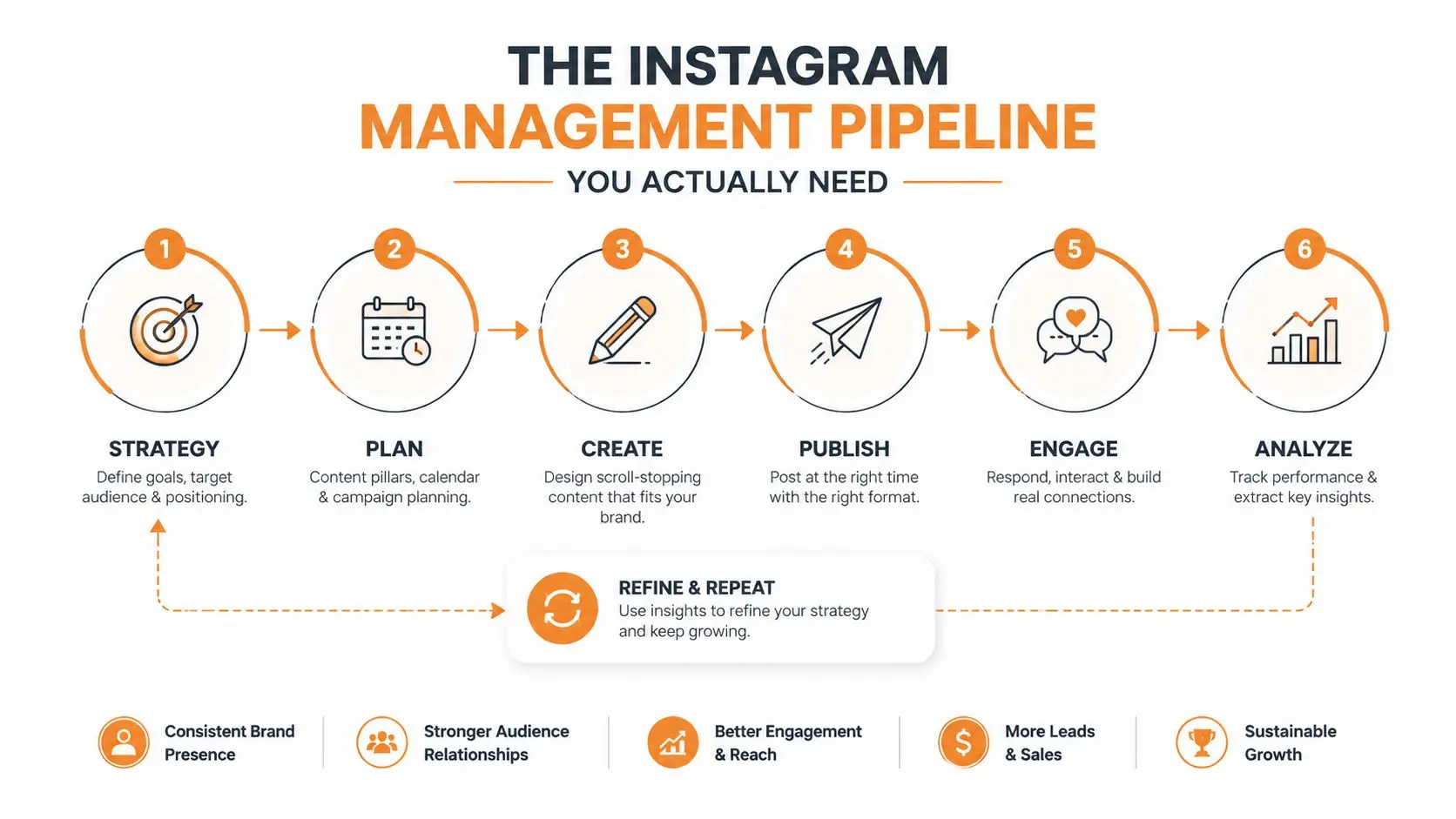
A documented social media management workflow makes those handoffs visible. Without it, teams keep solving the same missing-caption, wrong-version, and unverified-publish problems from scratch.
Define Goals, Audience, and Content Pillars
Do not open a calendar before you can answer one question: what should Instagram help the business accomplish next? A short strategy session prevents a feed from becoming a collection of attractive posts with no commercial or community logic.
Start by choosing one primary goal:
- Awareness, where reach and discovery matter most.
- Qualified traffic, where profile visits and link actions matter.
- Community depth, where replies, saves, shares, and conversations matter.
- Direct conversions, where messages, enquiries, or purchases matter.
Add one secondary metric. A reach goal paired with saves tells you whether attention had usefulness. A conversion goal paired with profile visits shows whether content is creating enough interest before someone acts. This keeps one flattering number from carrying the entire strategy.
Describe the audience using three practical fields:
- Role: Who is this person in their working, buying, or personal context?
- Tension: What problem, uncertainty, or desire is occupying their attention?
- Watering hole: Where do they already learn, compare, ask questions, or share experiences?
Content pillars turn that audience understanding into repeatable editorial territory. Keep the set narrow enough that every pillar earns a place in the weekly mix. A fitness brand might use Education, Transformation, Behind the Scenes, and Offer. For a DTC skincare brand, the map could look like this:
| Pillar | Primary format | Cadence | Example CTA |
|---|---|---|---|
| Education | Carousel | Weekly | Save this routine |
| Ingredient proof | Reel | Weekly | Comment with your question |
| Customer routine | Stories | Several times weekly | Reply with your skin type |
| Product offer | Feed post | Periodic | Send a product keyword by DM |
For each pillar, write three prompts: promise (what useful outcome does it offer?), proof (why should the audience believe it?), and CTA (what single next action fits the current intent?). A useful guide to social media content pillars can help turn broad themes into a usable planning system.
Build a Weekly Content Calendar That Sticks
A calendar survives busy weeks when it behaves like a production schedule, not a wish list. Convert the pillar map into a seven-day grid with fixed format slots, named owners, and enough open space to respond to what the audience is discussing.
- Monday: Carousel with an educational or problem-solving angle.
- Tuesday: Reel built around a demonstration, opinion, or fast lesson.
- Wednesday: Stories only, including a poll or question prompt.
- Thursday: A flexible slot for a pillar that needs reinforcement.
- Friday: A community, proof, or product-led post when appropriate.
- Saturday: UGC or a customer repost.
- Sunday: Light Stories, planning, or no feed post.
Layer 2 to 4 daily Stories over the core schedule when the team can sustain them. That range is a capacity choice, not a universal benchmark. Start with 3 to 5 feed posts per week, hold the mix steady, and measure before increasing output.
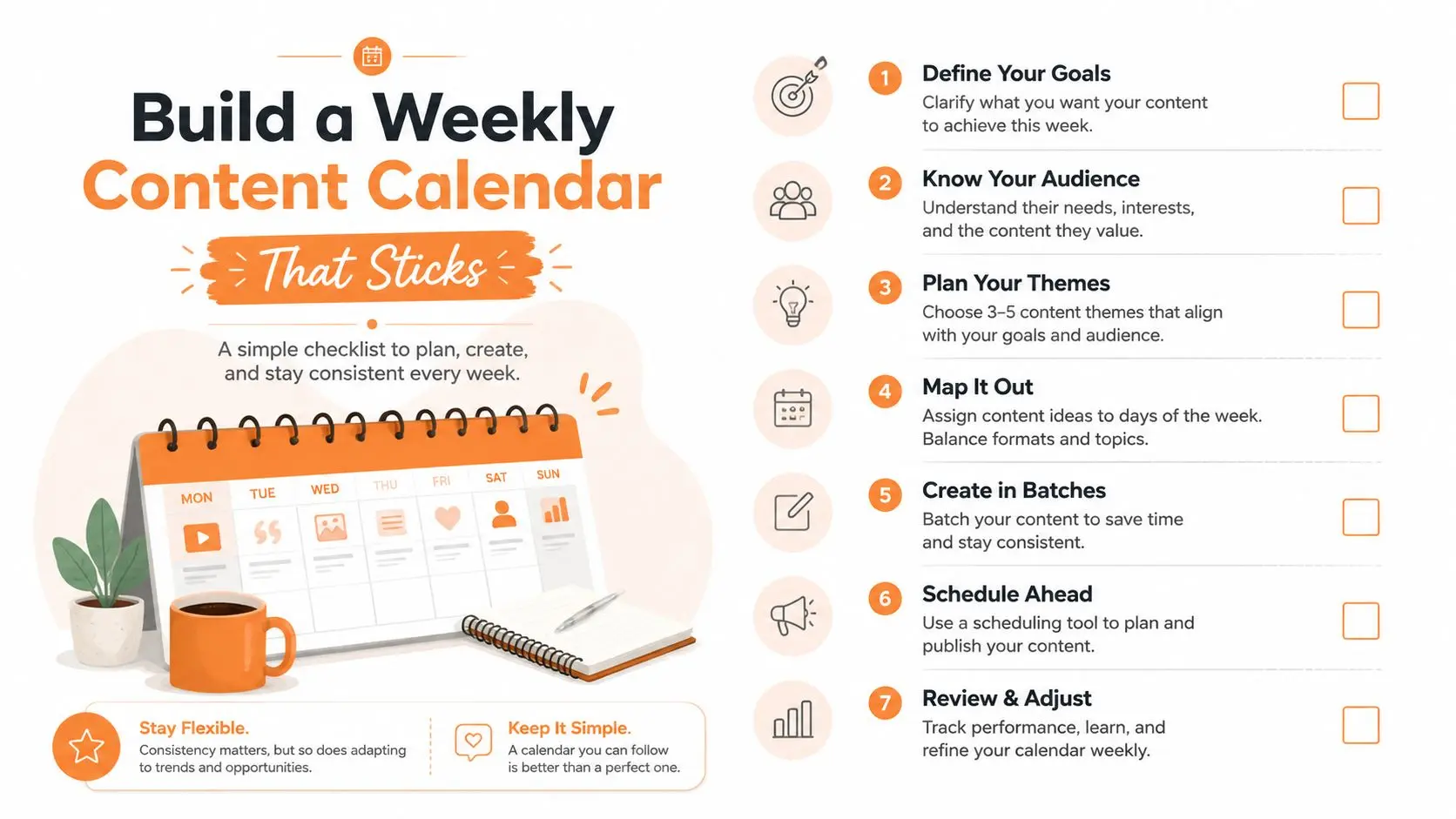
Work backward from publication
For a Tuesday Reel, filming must happen before editing, editing before caption QA, and caption QA before scheduling. Asset QA should check the crop, cover, audio, tags, links, and accessibility details. Assign realistic internal estimates instead of pretending every post takes the same effort.
- Avoid three Reels in a row: Give viewers a change of pace.
- Do not schedule more than two feed posts in one day: Protect attention and review capacity.
- Keep Wednesday light: Use it for replies, polls, and community prompts.
- Protect the buffer slot: Reactive content should replace a planned post only when it has a clear purpose.
- Freeze the calendar before production: Last-minute changes create version errors.
A social media content calendar workflow becomes useful when every entry carries its next action. “Reel idea” is not a production status. “Script approved, footage needed” is.
Write Captions and Produce Assets for Each Format
Caption structure and asset specifications should be decided together. A strong caption cannot rescue a badly cropped video, and a polished visual cannot compensate for a first line that gives people no reason to continue.
- Pattern interrupt: Use a clear first line under 125 characters.
- Body: Add two or three conversational sentences that explain the point.
- CTA: Ask for one low-friction action.
| Format | Aspect ratio | Caption length | Key asset rule |
|---|---|---|---|
| Feed portrait | 4:5 | 150 to 300 words | Export at 1080 x 1350 px |
| Reel | 9:16 | 30 to 80 words | Keep the hook in the first 1 to 2 seconds |
| Story | 9:16 | Sticker-led | Use 1080 x 1920 px and short overlays |
| Repost fallback | 1:1 | Adapt to context | Keep a clean square master |
Feed guidance supports square 1:1 at 1080 x 1080 px, portrait 4:5 at 1080 x 1350 px, and horizontal formats around 1080 x 566 to 608 px. Stories and Reels use a full-screen vertical canvas of 1080 x 1920 px at 9:16. Before exporting, confirm the dimensions with the Instagram post image-size tool.
Pair the message with the format
Use portrait feed posts when the idea needs visual height and reading space. Use Reels for movement, demonstration, reaction, or a sequence that benefits from timing. Keep text away from interface-heavy top and bottom areas, and burn in captions because many viewers watch without sound. The opening frame should establish the problem or payoff immediately.
A shared asset library should contain the master file, platform export, caption draft, cover image, and approval record. Version names such as campaign_pillar_format_date_v2 are more useful than “final-final-new.” For teams that need a starting point for repeatable layouts, social media post templates can reduce blank-page time, provided the designer adapts the template to the brand rather than publishing it unchanged.
Schedule and Publish Across Posts, Stories, and Reels
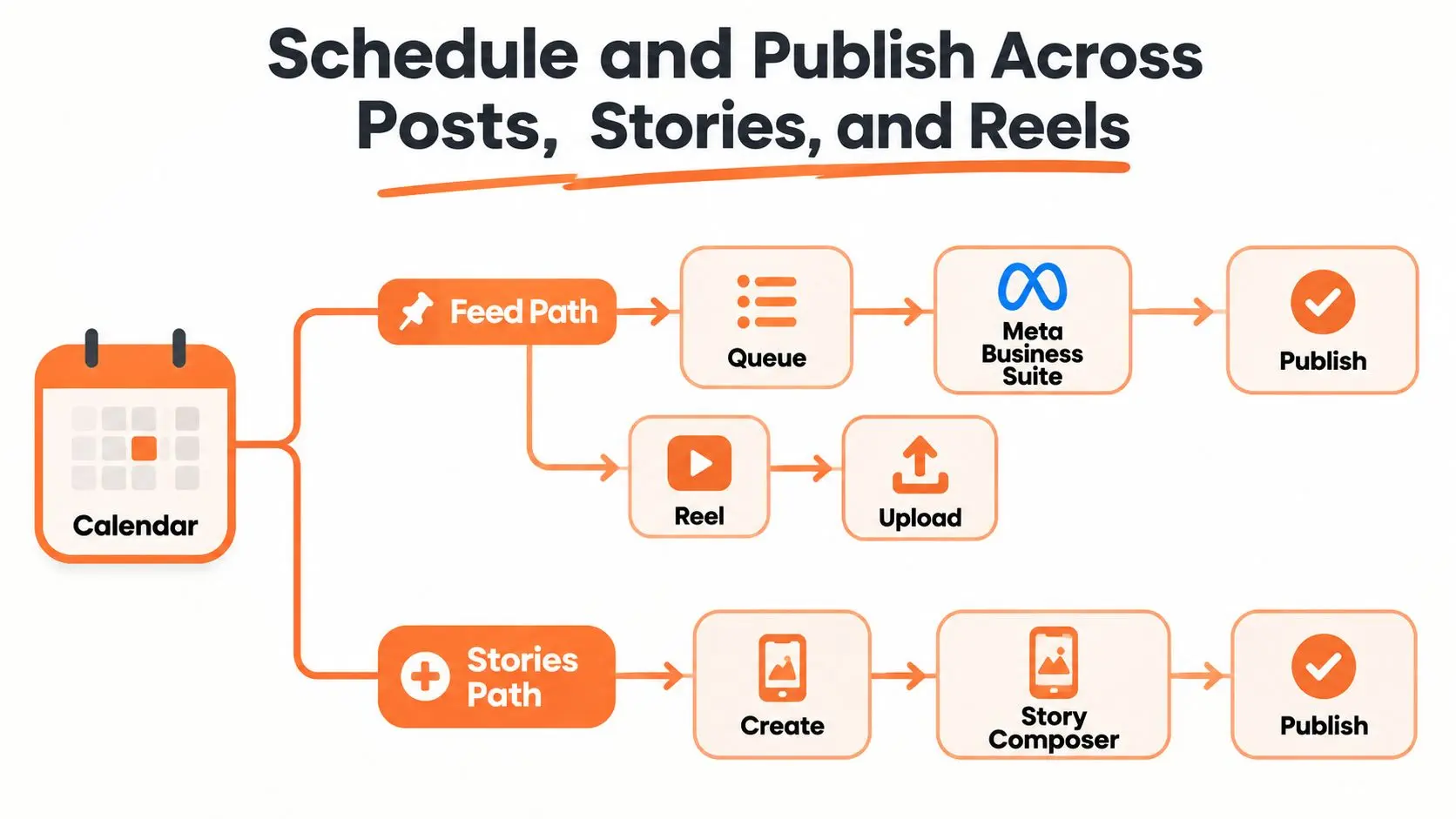
Scheduling turns a calendar into a delivery system, but each Instagram surface has different publishing mechanics. Feed posts and Reels can be queued through Meta Business Suite or an authorized scheduling platform. Stories often need more native handling when the post depends on stickers, music, or interactive elements, so schedule them in small daily batches instead of treating a week of Stories as one bulk upload.
Tag every queue entry with its format, campaign, content pillar, owner, and audience time zone. Keep first-comment hashtags in the publishing checklist if they help readability, and separate adjacent feed and Reel releases with a buffer so the posts do not compete for the same attention.
Protect the queue from avoidable failures
- Secure account access: Confirm two-factor authentication and avoid shared passwords.
- Maintain a backup admin: Keep a separate authorized device available for urgent checks.
- Review the first item: Manually confirm the first publication of the day.
- Verify delivery: Check the live post, crop, caption, tags, links, and audio after publishing.
- Archive evidence: Save a screenshot or live URL for reporting and repurposing.
Instagram's official Graph API uses a user access token, and its media_publish endpoint publishes created media. The official Meta documentation is a reminder that API-based workflows need format and media-access requirements checked before a campaign enters production.
For creators or founders building a repeatable short-form process, this guide to Instagram Reels for founders is useful during production. Scheduling should come after the Reel has passed its creative and technical checks, not before.
A practical guide to scheduling Instagram posts should end with verification, not with the click that sends an asset into the queue. Failed publishes can be quiet, and a same-day pass catches errors while the context is still fresh.
Run Daily Community Management Without Burning Out
Community management is where publishing becomes a relationship. A post may attract attention, but comments, mentions, Story replies, and messages determine whether the account feels responsive or abandoned.
Split the work into three passes:
- Morning sweep: Spend 15 minutes checking mentions, tags, Story replies, and urgent messages.
- Midday block: Use 30 minutes for comment replies and message triage during the audience's active period.
- Evening pass: Spend 15 minutes closing loops and flagging unresolved questions.
Those windows create a sustainable rhythm. They are not a promise that every account needs the same staffing pattern. A solo creator might combine the passes, while an agency can assign them across an account team.
Route conversations by intent
Sales-ready leads belong in a CRM or structured inbox. Support questions should point to the appropriate help material, while creator collaboration requests need a shared tracker with clear ownership. Saved replies can handle the questions that appear repeatedly, but personalize the opening line so the response does not feel copied.
Use a response standard that matches your capacity. During business hours, aim for a first touch under 2 hours, and aim for under 12 hours overnight. Those are internal service targets, not platform guarantees, and they only work when someone owns the inbox.
A saved reply should save typing, not replace judgment.
Negative or repeated feedback deserves a weekly digest. Record the wording people use, the product or process involved, and whether the team resolved the issue. Protect recovery time by turning off push notifications outside working hours, with an escalation path for genuine emergencies. Constant availability creates fast replies for a while, then weakens the quality and consistency of every reply that follows.
Donivo is focused on publishing, not inbox management. It can connect Instagram and other networks, adapt and schedule content, retry failed publishes, and alert you when attention is needed. Use a separate inbox, CRM, or support workflow for comments, messages, listening, and customer-service work.
Measure, Review, and Optimize the Calendar
Review the calendar as an operating system, not as a list of published posts. Pin this checklist inside the project tool so each handoff has a visible owner:
- Strategy lock: Primary goal and secondary metric approved.
- Pillar mapping: Each recurring theme has a promise, proof, and CTA.
- Calendar build: Format, slot, owner, time zone, and campaign are assigned.
- Asset production: Master files, exports, captions, covers, and checks are complete.
- Scheduling: Queue entries are tagged and approved.
- Community management: Mentions, comments, Story replies, and messages have owners.
- Measurement: Format-level performance is recorded against the correct goal.
- Iteration: One documented change enters the next planning cycle.
Measurement should answer a decision-making question. Give every content pillar one primary KPI and one secondary metric that helps explain the result. A discovery post should not be judged by the same standard as a post intended to generate messages.
One 2026 benchmark puts Instagram's overall organic engagement rate at roughly 0.48% on average, down 24% year over year, based on an analysis of 15 million posts. The Instagram benchmark report shows why comparisons must stay format-specific. Format mix changes the denominator, and engagement calculations commonly include likes, comments, saves, and video views relative to reach.
| Format | Primary KPI | Secondary KPI | Review cadence |
|---|---|---|---|
| Reels | Reach | Saves and watch behavior | Weekly |
| Stories | Completion rate | Sticker taps and replies | Weekly |
| Feed posts | Saves | Profile visits | Weekly |
| Conversion slots | DMs | Link clicks | Weekly |
| Full calendar | Format-specific engagement | Follower growth | Monthly |
Run the weekly review
Set aside 15 minutes on Monday to compare the previous week's plan with what published. Start with exceptions rather than scrolling through every post:
- Underperforming posts: Check whether the issue was the hook, format, timing, topic, or execution.
- Repeated winners: Identify themes, proof types, and openings that earned useful actions.
- Posting drift: Record whether late approvals or production delays moved content away from its intended slot.
- Format differences: Compare a Reel with other Reels, not with the account's full average.
- Audience signals: Capture saves, replies, messages, and questions that should affect the next calendar.
A current Instagram study reports that brands published 24% more content year over year, while Instagram generated 27% more views and 19% more engagement overall. Treat that kind of benchmark as a prompt to inspect your content mix, not as a volume quota. Examine which distribution pattern offsets weaker efficiency.
Use the monthly review to examine pillar performance and test one variable at a time. Rotate slots when a format repeatedly fails to earn its intended action, but do not change the hook, posting time, format, CTA, and topic together. An improvement will otherwise have no clear cause, and a decline will leave the team unsure what to restore.
Optimization loop: Record, hypothesize, change one element, observe, and document the rule.
The review also protects publishing reliability. If a scheduled post fails, inspect the queue, account connection, media requirements, and live profile before rescheduling. Log the failure, notify the owner, and preserve the approved asset so nobody edits the wrong version under pressure.
Build the publishing queue around verified ownership, format-level review, and a recorded next action. Visit Donivo's social media scheduling guide for the broader multi-network workflow, then use Donivo to connect accounts, schedule through a calendar and queue, organize multiple workspaces, and receive retry notifications when a post fails.